
KeyNode Solutions Service Digital Employee
Get a Free Consultation
KeyNode Solutions Service Digital Employee
Get a Free Consultation
Service Digital Employee

The KeyNode Solutions Service Digital Employee is an AI agent that works alongside your service team inside Salesforce. It summarizes cases, reads the mood of every customer message, spots accounts at risk of leaving, triages new cases and keeps your knowledge base current.
It runs inside your existing Salesforce org and writes its work straight onto your records, so there is no new system for your team to check. Your people stay in charge of every customer conversation.
Book a free 30-minute AI Use Case Mapping call with our 100% US-based team at hello@keynodesolutions.com, or explore all of our AI Solutions.
The Service Digital Employee Functions
 Each KeyNode Solutions Service Digital Employee is capable of performing a wide array of functions. Our approach is customized: every function is set up through settings with no code required, and you switch on only the ones your team needs.
The functions work as a team. Case summaries help Front-Line Triage write better replies and help Knowledge-Gap find what is missing, and sentiment and churn risk tell Triage when a case needs a person.
1. Front-Line Triage
Answers what your articles can and escalates when they can’t.

When a customer emails in or a case is created, the Service Digital Employee drafts a reply only when your published articles answer it, and shows which articles it used. Urgent, legal, cancellation and angry cases are routed to a person with a handoff note and an alert.
Automatic replies for confident, approved case types are optional and stay off until you switch them on.
Why it matters: Agents start routine cases from a ready answer grounded in your own articles, and sensitive cases reach a person with context.
Tune it: how sure it must be, escalation rules and VIPs, and which case types may auto-reply.
2. Case Sentiment
Reads the mood of every customer message on a case.
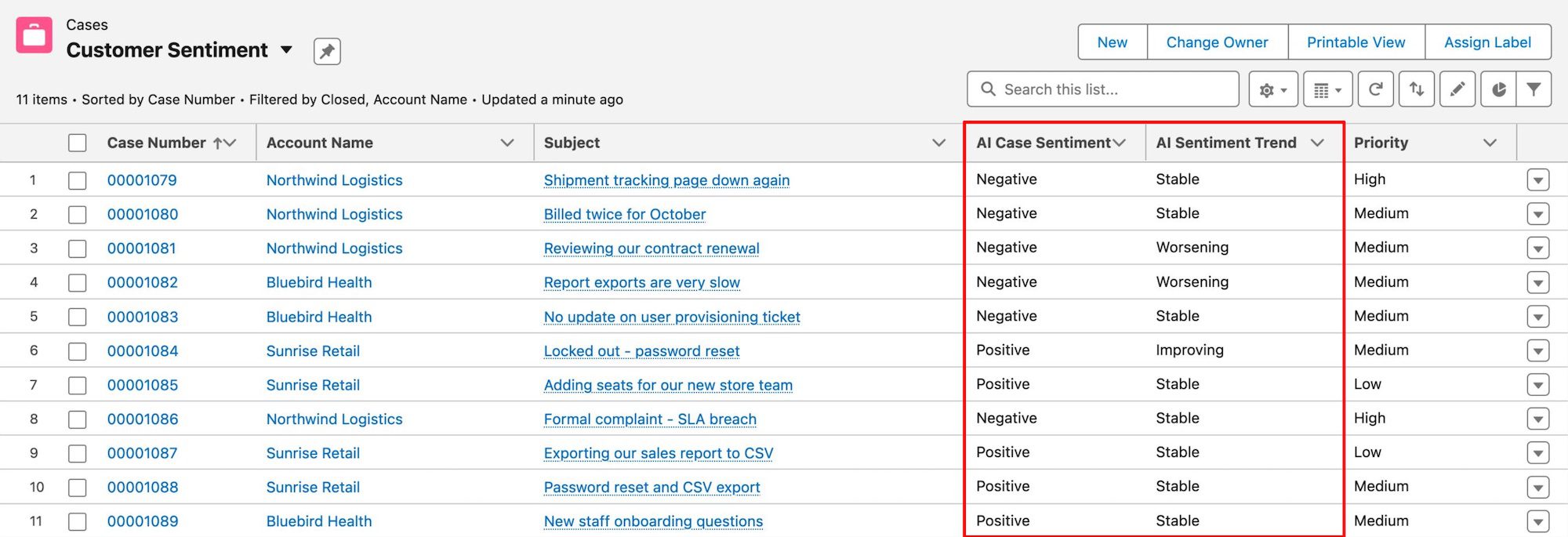
When a customer emails or comments on a case, it labels the latest message Positive, Neutral, Negative or Angry. It also tracks the trend as Improving, Stable or Worsening, and flags upset customers so Front-Line Triage routes them to a person.
Why it matters: Upset customers reach a person, and your team can see at a glance whether a case is getting better or worse.
Tune it: on / off and daily volume.
3. Churn-Risk
Spots accounts at risk of leaving before it is too late.

Every morning, it reviews accounts with recent case activity and rates each one’s churn risk from None to High, with a 0–100 score and a plain-English reason. When an account rises into High, it alerts the account owner or your CSM, and an At-Risk Accounts list keeps them in one place.
It is steady by design: one bad email won’t spike it, and risk eases as things calm down.
Why it matters: The people who can save an account hear about the risk while there is still time to act.
Tune it: who gets the alert, accounts reviewed per day and the look-back window.
4. Knowledge-Gap
Keeps your knowledge base current by learning from closed cases.

It runs when a case closes and again every week. It notes which articles fully or partly covered the problem, drafts additions to articles that keep falling short, and drafts a new article for any recurring problem nothing covers. Additions go at the end of the article with your text untouched.
It never publishes: your team reviews every draft.
Why it matters: Your articles keep pace with the problems customers actually bring, which gives Front-Line Triage more to answer from.
Tune it: look-back window, cases needed to trigger a draft, drafts per week and case types included.
5. Case Summary
Turns long case threads into a clean handoff note.
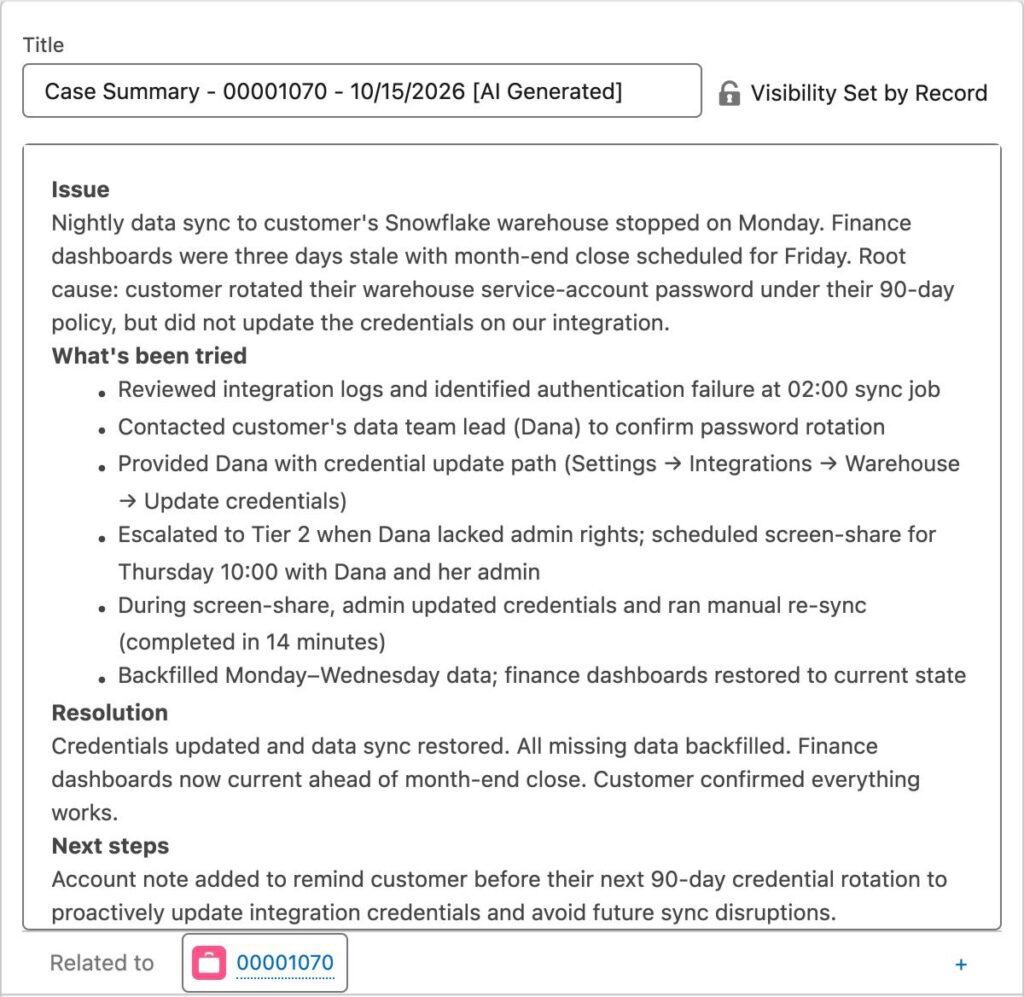
When a case closes or changes owner, or someone clicks Summarize, it writes an internal note covering the issue, what has been tried, the resolution and next steps. When a case closes, it also records a short issue and resolution you can report on. Summaries are never visible to customers.
Why it matters: The next agent picks up the case without rereading the whole thread, and you get resolution data you can report on.
Tune it: headings, tone and length.
6. Custom Function
Beyond the five functions above, we can build custom functions around your service team’s needs. Contact our team to talk it through.
How is a Service Digital Employee Priced
How a KeyNode Solutions Service Digital Employee is priced is a very common question. You pay for:
Below is a calculator to provide an estimate using current published pricing for the underlying AI models and workflow orchestration platform, applied to typical usage across the Service Digital Employee’s functions. Actual cost depends on real lead volume and usage patterns. Please note that this is a running-cost estimate, not a quote.
FAQs About the Service Digital Employee
Our Recent AI Solutions Reviews
“We’ve been extremely impressed by KeyNode team’s expertise with Claude and AI-driven automation. Your guidance around custom connectors and identifying ways to connect our existing systems has opened our eyes to how many manual, time-consuming processes we can potentially automate. You’ve done a great job of not only helping us implement solutions but also helping our team understand what is possible and think differently about how we work.”

Contact us for a Free Consultation
We provide a free AI Use Case Mapping session. We’ll look at your Salesforce org and tell you which AI Solution fits best.