

 With the latest Salesforce release (Spring ’25) approaching, you will get access to a wide range of exciting new features. There are hundreds of pages of release notes that detail these improvements. We dig through all of these to find the new features that will directly impact the business users of Salesforce – and we present them in easy-to-understand terms.
Forecasting Improvements
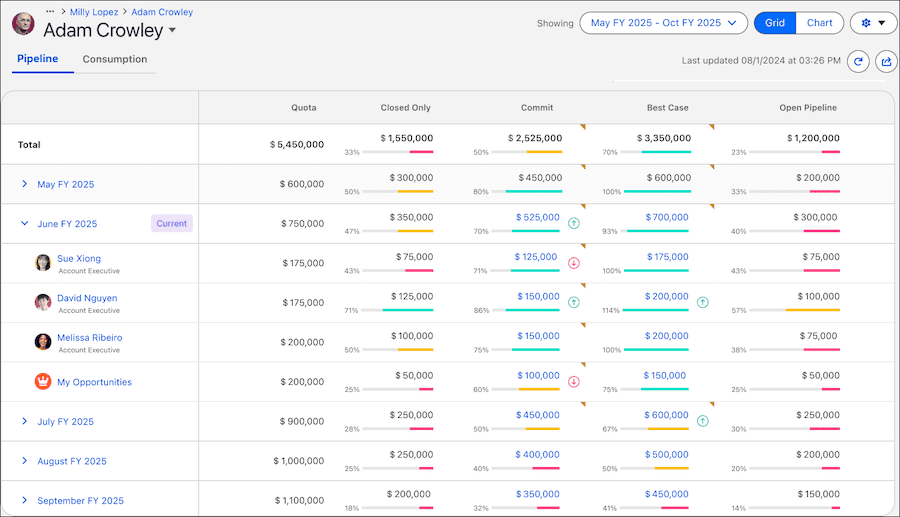
Forecasting has had several names over the years and is now being changed from Collaborative Forecasting to Pipeline Forecasting. It now includes forecast models that use data from Data Cloud including consumption-based forecasting, displaying all your forecasts on one page.
Sales Action Plans
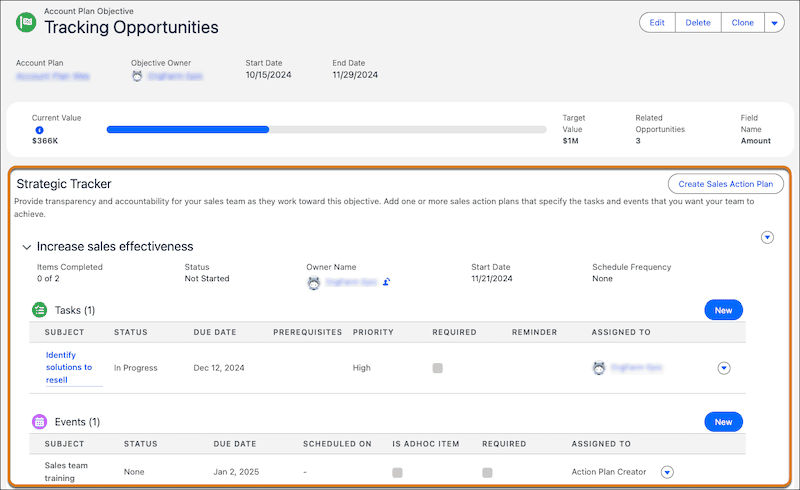
Extending this feature from the Industry Clouds, Sales Action Plans specify both the tasks and events that you want users to achieve. These can be associated with accounts, cases, campaigns, contacts, contracts, leads, and opportunities. Action Plan Templates can be used to standardize these tasks and events.
If you also use sales account plans, sales action plans appear in the Strategic Tracker on your account plan objectives.
Account Plan Objective Tracking
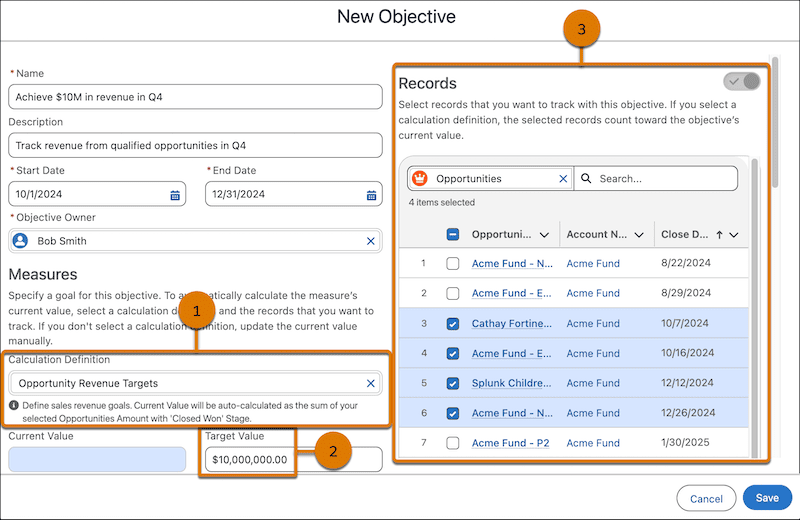
Improvements to Account Plan objectives allow the values for objectives to be automatically calculated. No more manually entering values for quantities or qualities and they can also summarize related record values. When sales team members complete activities that meet the objective definitions, the calculations are updated automatically. You can still create objective measures that require manual progress updates.
As a Sales user, when adding an objective to a sales account plan, you choose a calculation definition (1), specify a target value (2), and select related campaigns, cases, contacts, or opportunities (3).
Agentforce Sales Coach
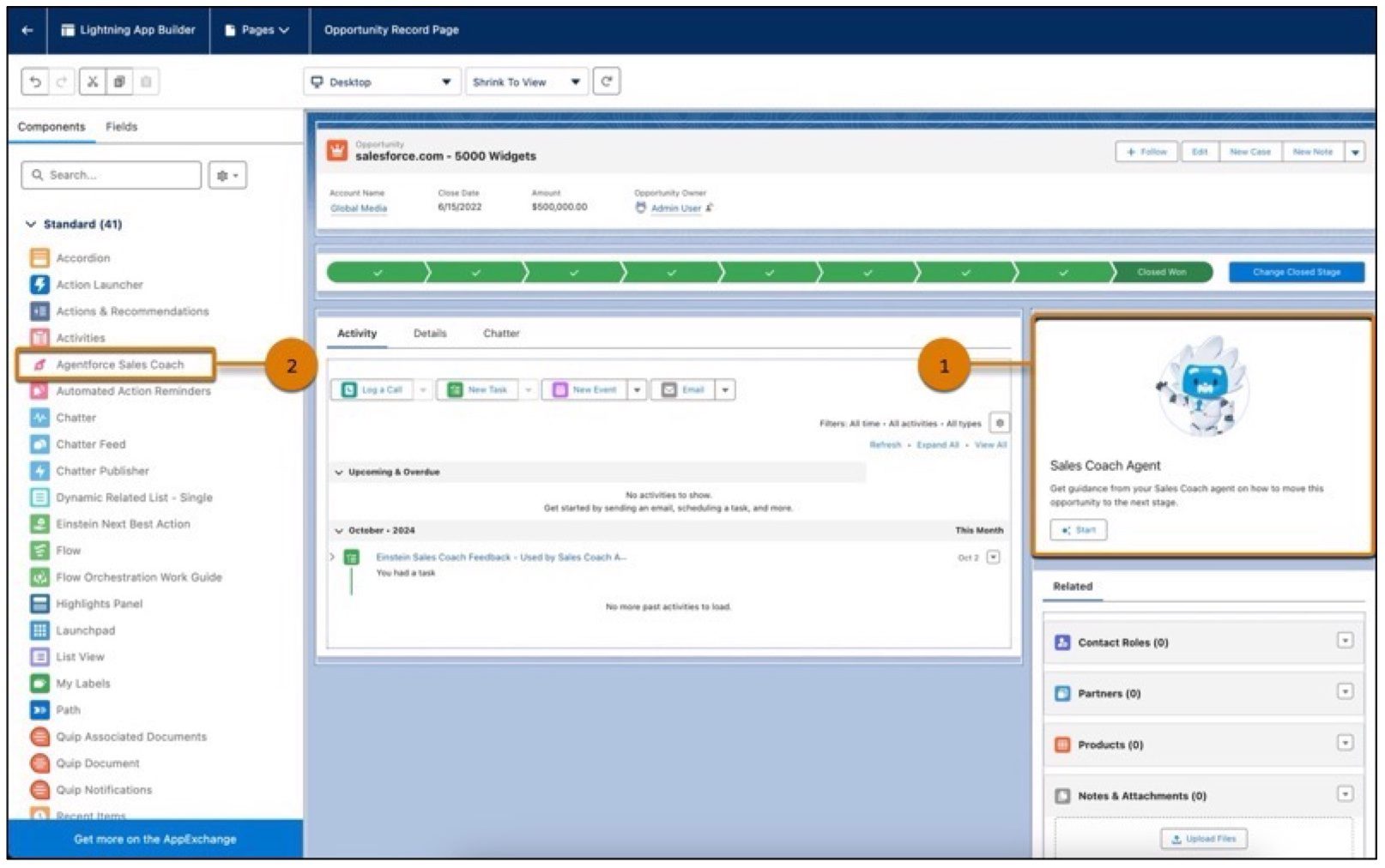
Being able to coach a large, widely distributed sales team that may cross many time zones can be a challenging exercise for any Sales Leader. The Sales Coach agent (an Agentforce agent) can help tackle challenging customer conversations, improve Sales Rep’s performance, and increase Return on Investment.
Available for Sales Cloud Enterprise, Performance, and Unlimited editions with the Agentforce Sales Coach add-on. A new Lightning page component on the Opportunity pages (1) and (2) enables Sales Reps to practice their sales pitch with the Sales Coach agent analyzing the transcript and providing feedback.
To generate accurate, actionable, and personalized coaching, the Sales Coach agent includes these three new Agent topics, with two of them involving a role-play scenario with the agent.
- Sales Coach Agent: Opportunity Coaching
- Sales Coach Agent: Negotiation/Review Role-Play
- Sales Coach Agent: Proposal/Pricing Quote Role-Play
Sales Coach agent includes a new prompt template type called Sales Pitch Feedback.
Faster Lightning Performance
As more Salesforce objects (like Leads, Accounts, and Opportunities) move to use the modern Lightning Web Components framework, significant performance improvements and other features become available. In particular, more sort options for list views, and more sort options for related lists, along with dynamic features to make Lightning Record pages shine.
Sort List Views by Multiple Columns
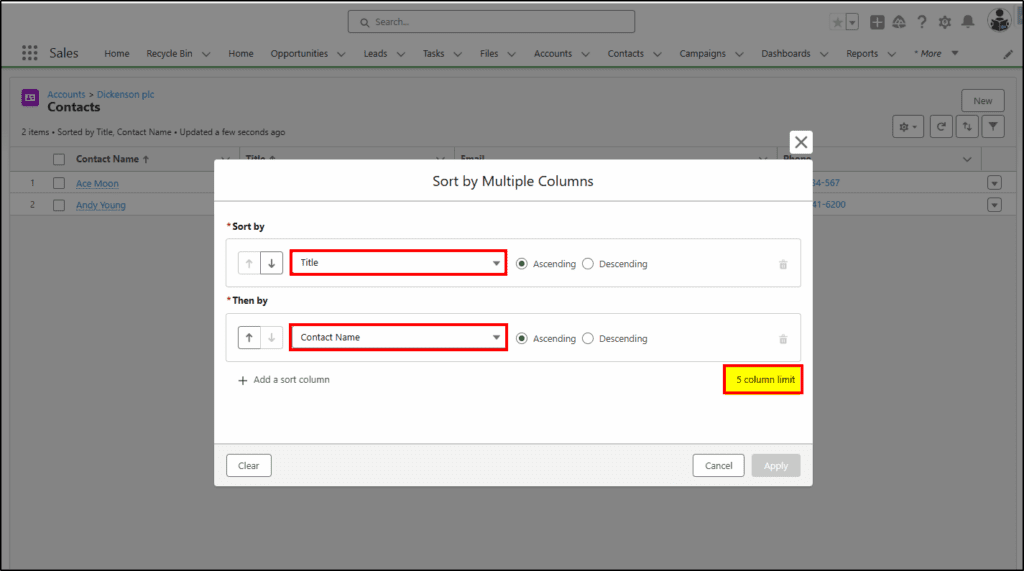
When viewing a list of records (eg All Opportunities), you could previously only sort the list by a single column. Now in Spring ’25, you can choose up to five (5) columns to sort by.
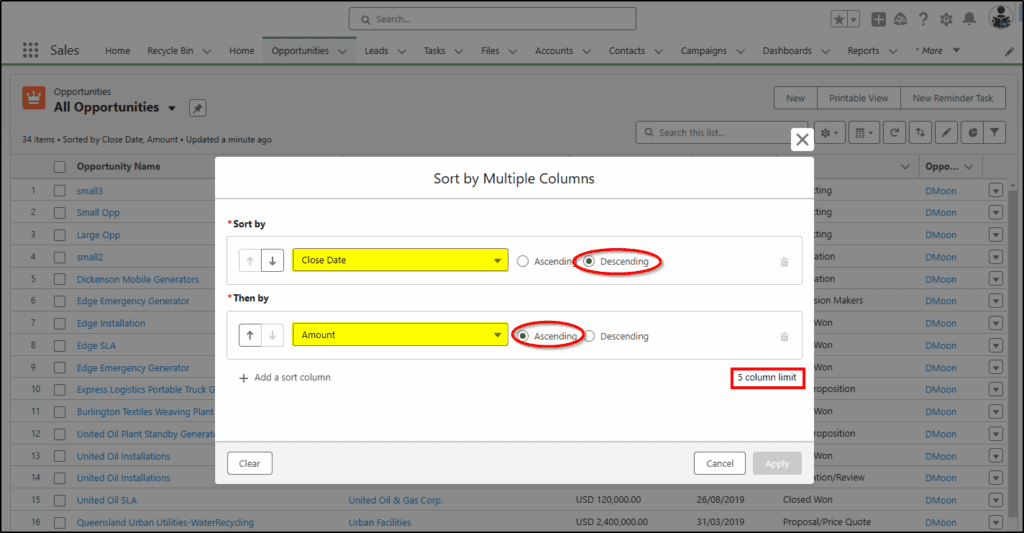
Selecting the sort fields and choosing Ascending or Descending order.
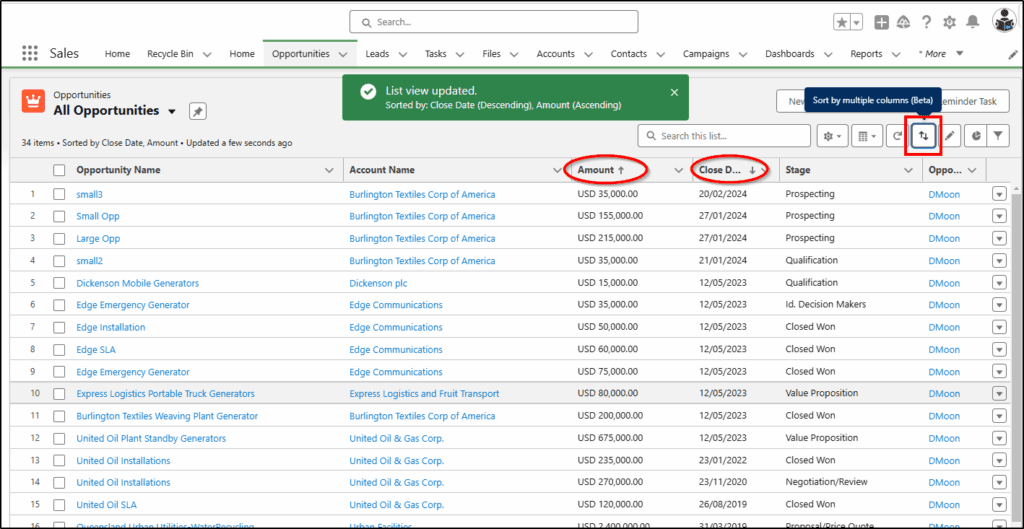
Arrows in the headers show the sort columns and their direction.
Sort Related Lists by multiple columns
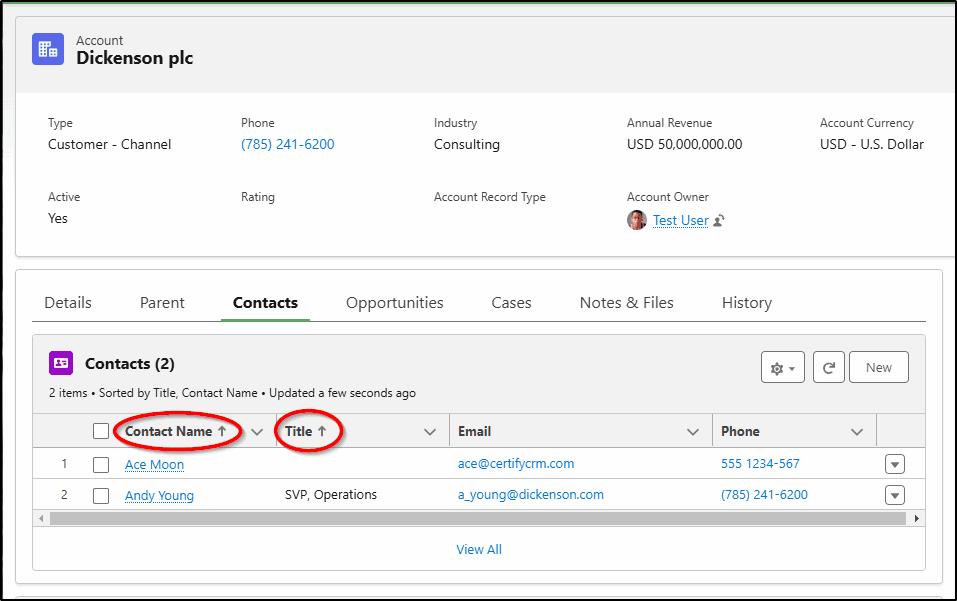
Similar to the list views, up to 5 columns can also be used to sort Related Lists. To access the sort feature you may need to select View All records first.
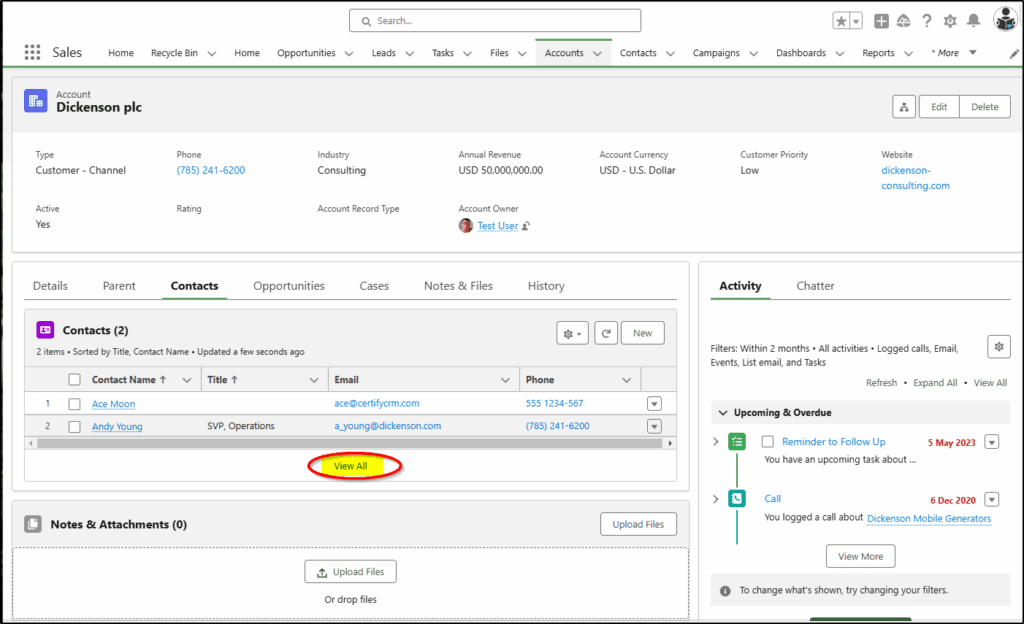
Next, you select the sort icon to specify the required sort fields.
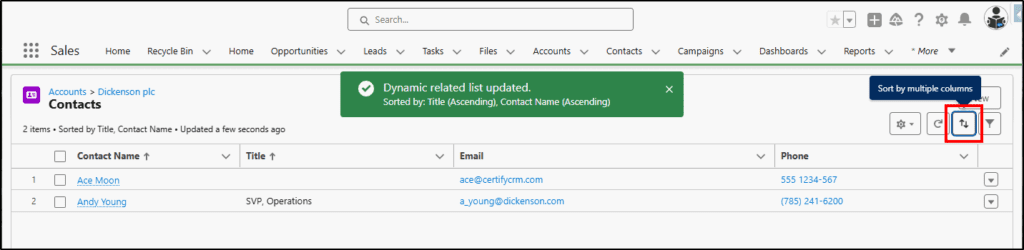
After selecting to sort fields, choose the sort direction – Ascending or Descending.
The sort fields and directions on the Related List are now shown by the arrows in the column headers.
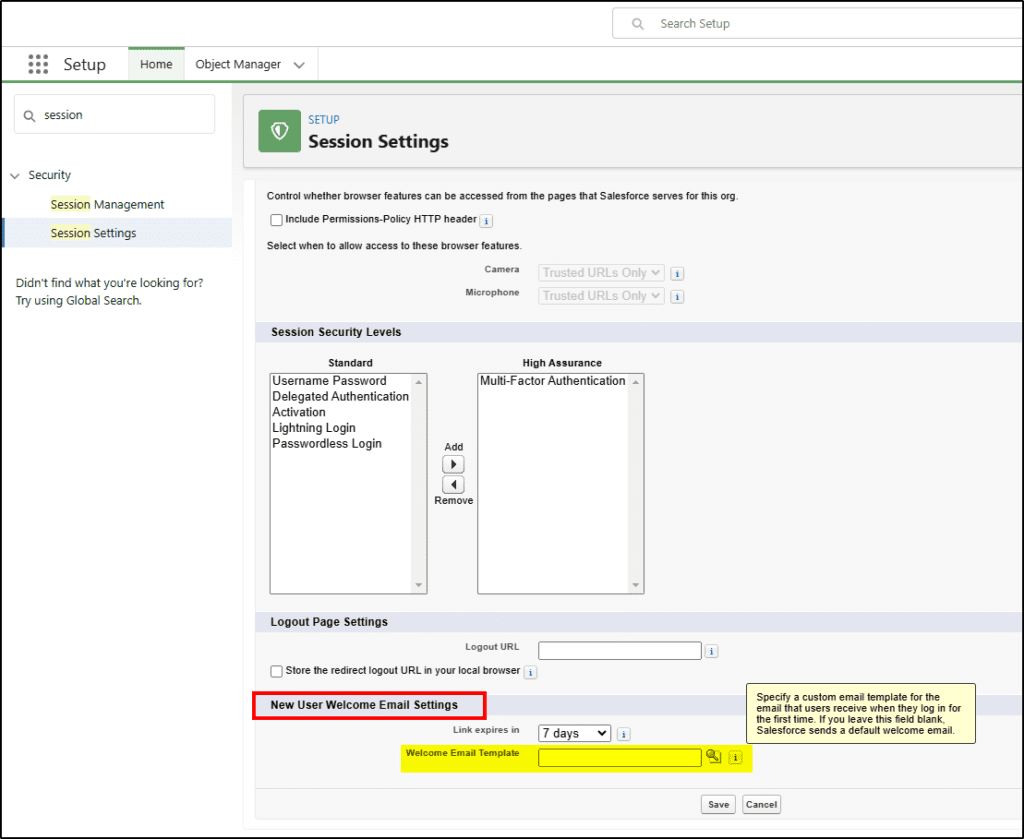
New User Email Template
You can now create a custom email template to send to a Salesforce user when you create a new user account for them. This allows you to customize your messaging and onboarding process when welcoming new Salesforce users to your company. If you leave this blank, they get the default email.
New Flow Automation Features
While many new features have been released for Salesforce Flow automation, the following three can have a significant impact on end users. Here is how your team can use them to build better automation for you to use.
Reactive Screens in Flows
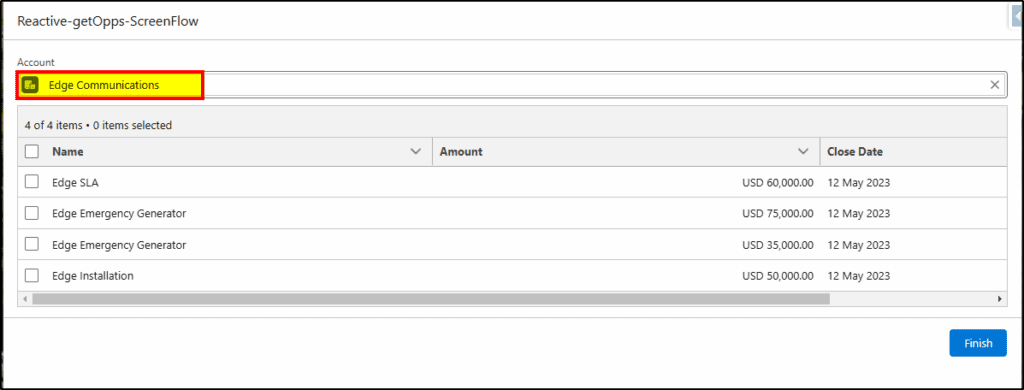
Previously, screen flows had to consist of many individual pages with you clicking next to navigate to the next page or to trigger some action to occur. Now with Reactive Actions in screen flows, many of these actions can be triggered by you simply selecting a record or choosing a particular value from a picklist.
In this example, selecting an account record:
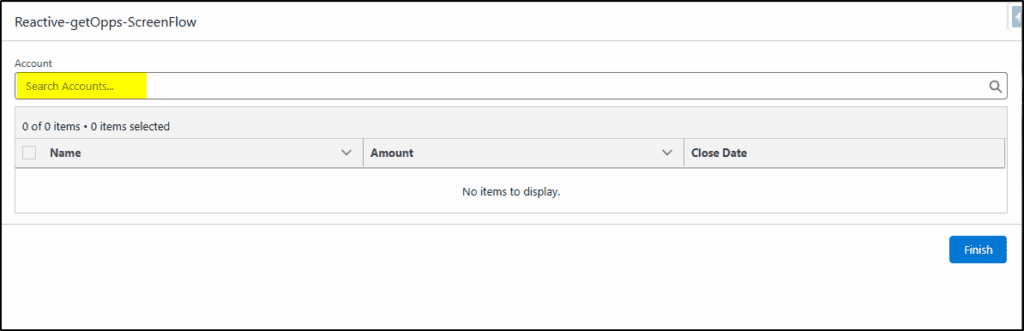
will display all the open Opportunity records for that Account, without having to navigate to the next page. You simply select the Account record you want. If you choose another account, the relevant opportunities for the new Account will be shown.
Immediate Data Validation in Flows
Previously, validating a field in Flow was done after you left that page and moved to another one. Now, the validation can be done right inside the field before you leave it, making the data entry process simpler and more efficient.
Visual Progress Indicators for Flows
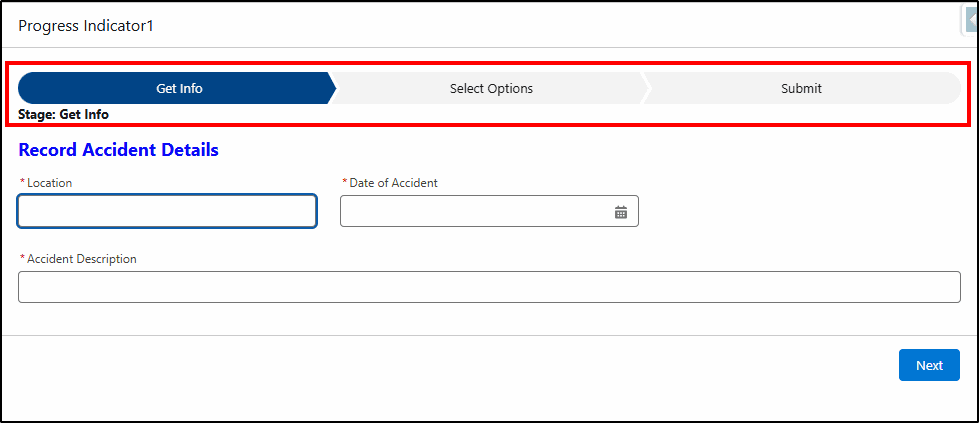
Previously when you were interacting with a flow that had many screens, there was no way of knowing how far through the flow you have progressed. Now with Visual Progress Indicators, a “path” like indicator can be displayed on the top or bottom of the page to indicate this progress.
There are three variations of the indicator:
1. Path – similar to that shown for Opportunity or Case records. (as shown below)
2. Simple indicator bar at the top of the page.
3. Simple indicator bar at the bottom of the page.
Work Orders and Work Order Line Items
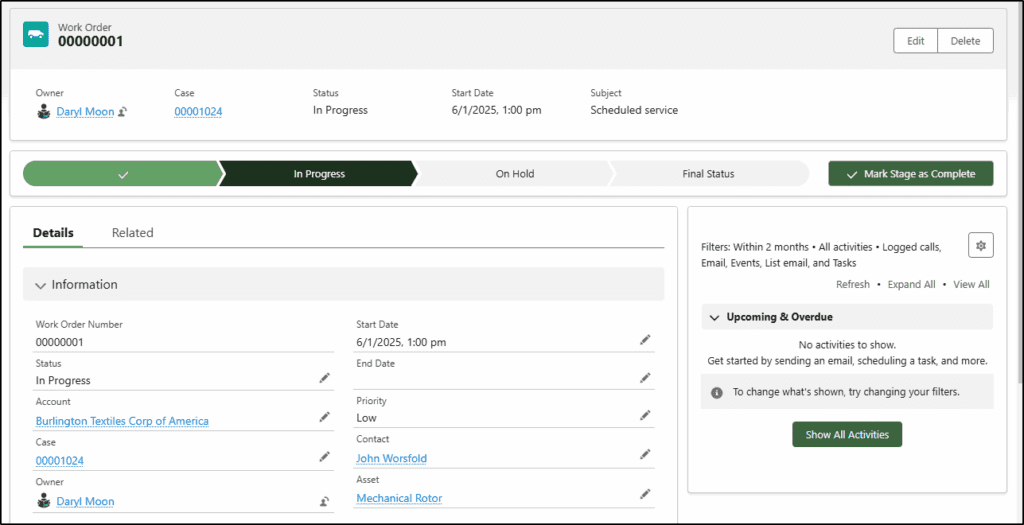
Work Orders and Work Order Line Items are now based on the new Lightning Web Components technology which means they gain increased performance and support all the new lightning features including Dynamic Forms, Dynamic Actions, Dynamic Related Lists, and the Dynamic Highlights Panels. If you use Work Orders, be sure to ask your Salesforce team to update these pages to take advantage of these new features.
At KeyNode Solutions, a leading Salesforce Partner, we want to keep our visitors and clients up to date with the latest information. If you have any questions about this release, contact us at hello@keynodesolutions.com or call us at 1-858-215-5371.
About the Author
 Daryl Moon brings over 40 years of experience across consulting, technical, management, and training roles in government and the private sector. He combines deep theoretical knowledge with practical, hands-on expertise.
A Salesforce professional with nine certifications and more than 1,100 Trailhead badges, Daryl continues to design and deliver Salesforce training through CertifyCRM.com. He is an active contributor to the Salesforce ecosystem, regularly presenting at user groups, virtual conferences and within the Trailblazer Community. You can learn more about Daryl at https://www.linkedin.com/in/daryl-moon/.
 KeyNode Solutions is a full-service Salesforce Consulting Partner company. We deliver the ultimate Salesforce solutions to grow your business: implementation, integration, customization, and development. Our best-in-class Salesforce managed services for ongoing support available nationwide.

Salesforce Winter ’27 – The Top Features
The next Salesforce release is fast approaching, with releases being scheduled on Sept 4, Oct 2nd and Oct 9th. Being the release just before Dreamforce, it’s jam-packed with lots of great new features. Once [...]

Salesforce Summer ’26 – The Top Features
The next Salesforce release is coming soon, with releases being scheduled on June 5, 12, and 13th. This release is packed with lots of great new features and still contains a heavy emphasis on [...]

How Salesforce Service Cloud Transforms Customer Support Operations
Customer expectations have never been higher. Today’s customers demand fast responses, personalized interactions and consistent service across every channel. Organizations that rely on disconnected systems and manual processes struggle to keep up. To stay [...]
Measuring & Improving Customer Support Performance with Salesforce Analytics
Customer support leaders face increasing pressure to deliver faster service, higher satisfaction and consistent performance across teams. Without accurate data and real time visibility, it becomes difficult to identify gaps, manage workloads and drive [...]

Using Salesforce to Deliver Omnichannel Customer Support at Scale
In today’s connected world, customers expect fast and consistent support across every channel. Whether they reach out through email, phone, chat, social media or self service portals, they want seamless interactions without repeating information. [...]

How Salesforce Automation and AI Reduce Support Response Times
Fast response times are critical to delivering exceptional customer service. In a digital first environment, customers expect immediate answers and seamless interactions across every touchpoint. Long wait times and delayed resolutions can quickly erode [...]