

 The next Salesforce release is coming soon, with releases being scheduled on June 5, 12, and 13th. This release is packed with lots of great new features and still contains a heavy emphasis on Artificial Intelligence. Even without the AI features, there’s something here for everyone.
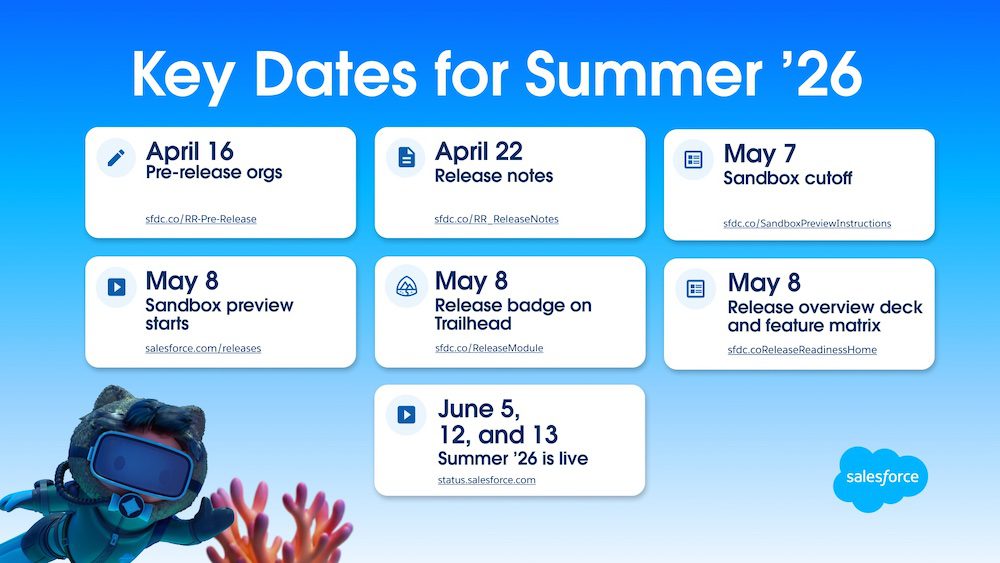
Key dates for the Summer release are:
Reports and Dashboards with Brand Color Palettes
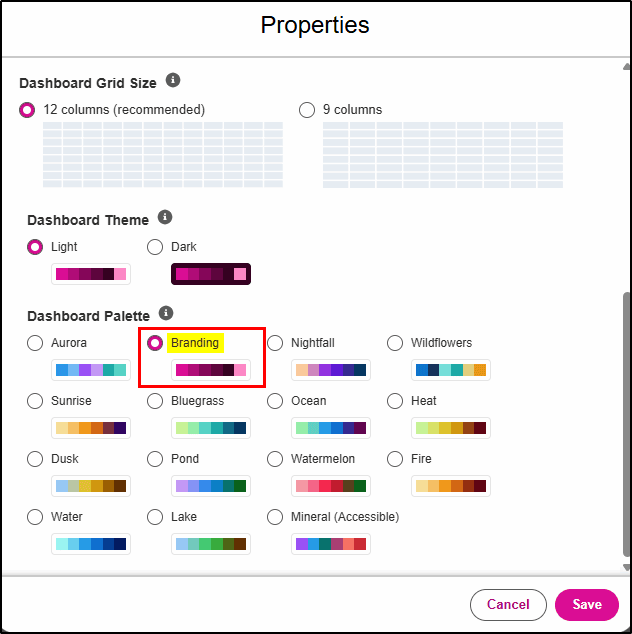
In Summer ‘26, you can apply your corporate Branding theme to Reports and Dashboards.
Once you have configured a default theme via Setup -> Themes and Branding, you can now apply it as follows:
Dashboards: In the Dashboard properties, select “Branding” in the Dashboard Palette.
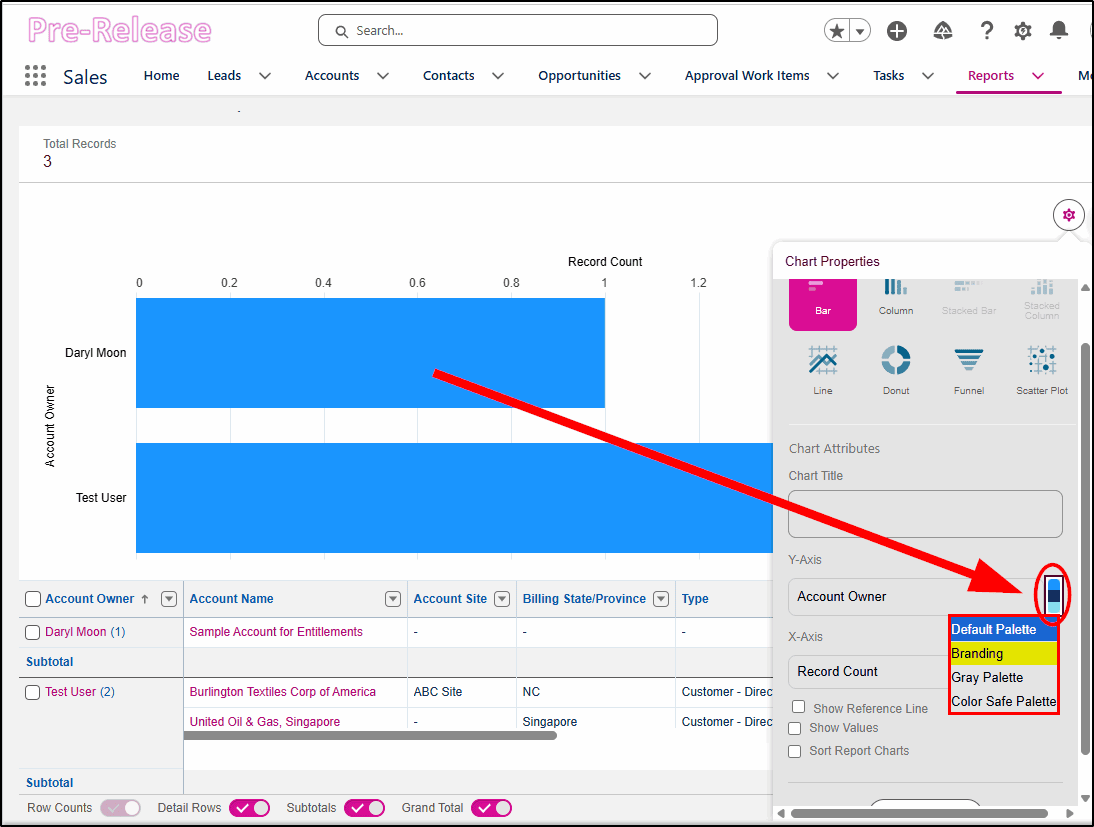
Reports: In the Report Chart properties, select “Brand”.
Branding Applied to a Dashboard
For reports with an embedded chart, click here to access the Branding option:
Branding Applied to a Report Chart
Web Console
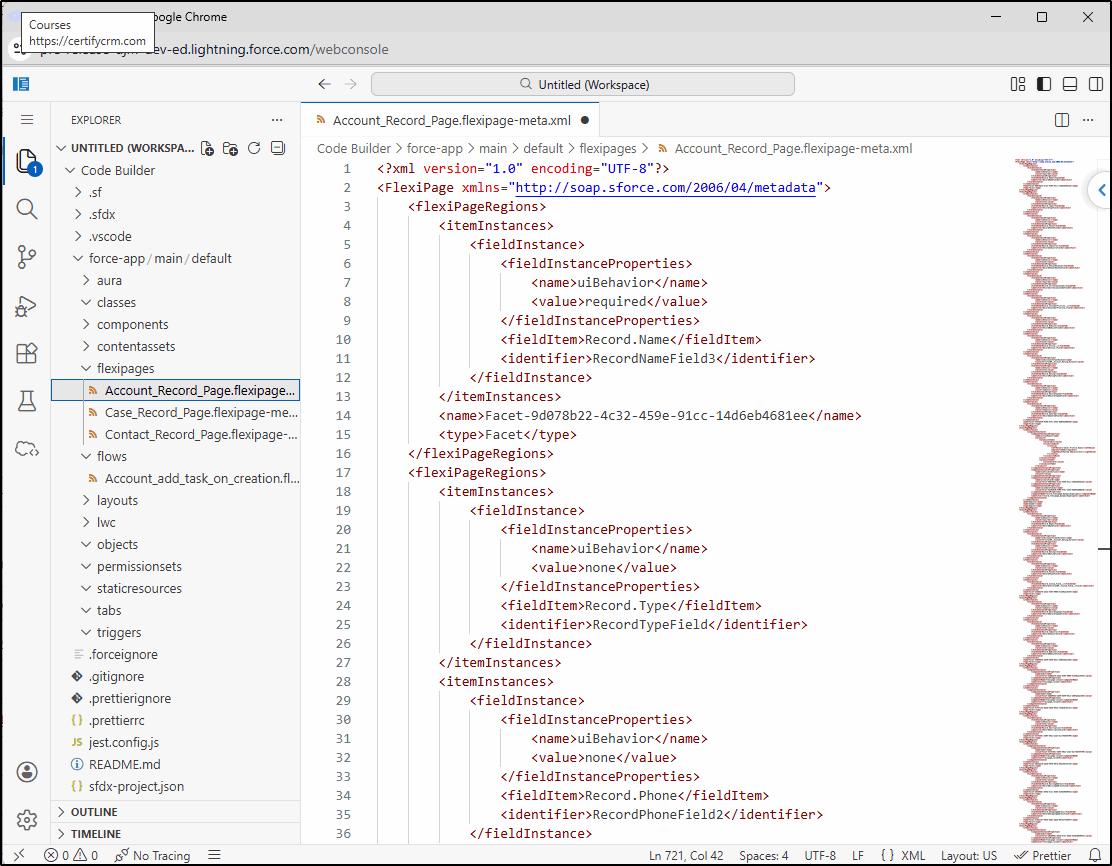
While not technically a Summer ’26 new feature (it’s available now), the Salesforce Web Console (Beta) is a NEW browser-based tool for developers. There is no need to install additional software; it’s designed to help developers debug, inspect, edit, and validate right within Salesforce.
Once enabled under Setup -> Web Console (Beta), it will appear on the setup gear icon.
https://developer.salesforce.com/docs/platform/webconsole/guide/get-started.html
Field Access in Object Manager
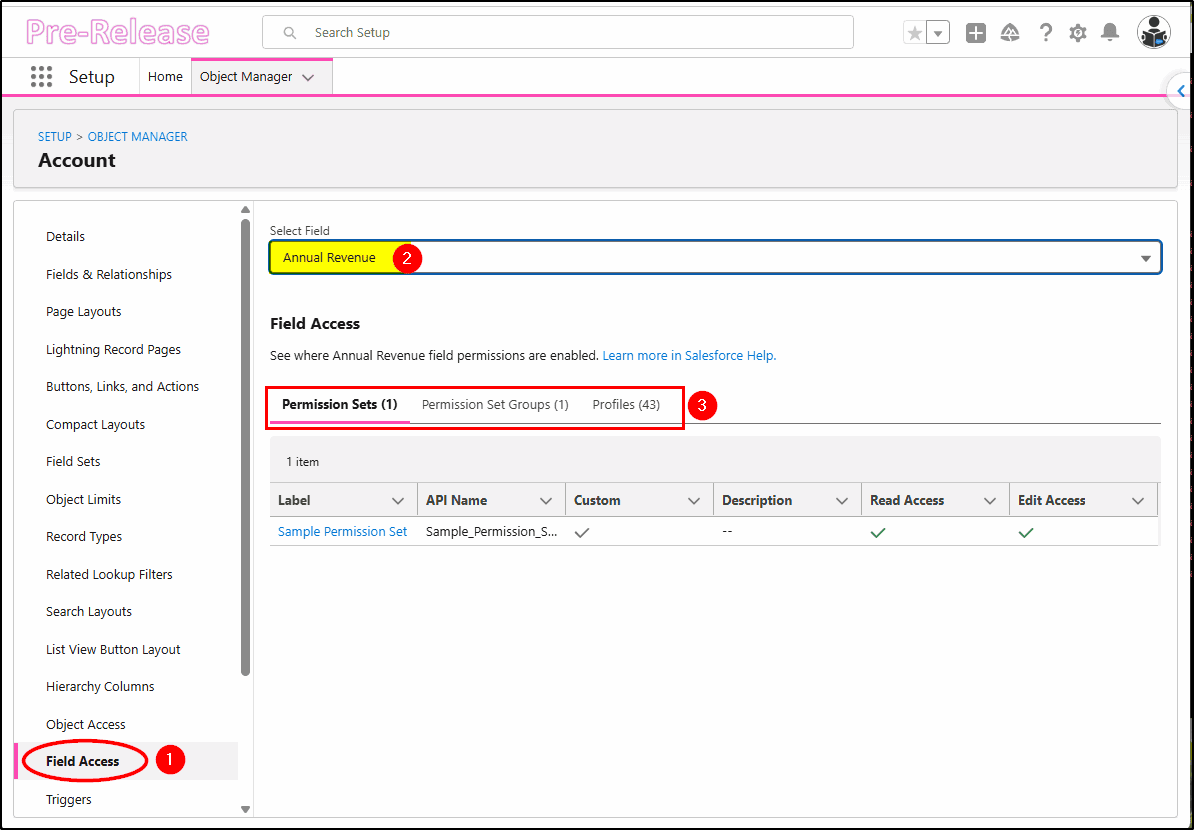
One of the biggest frustrations for Salesforce admins is managing user access. The new Field Access utility helps solve this problem by showing the Permission Sets, Permission Set Groups, and Profiles where access to a specified field is configured. Choose Field Access from within Object Manager (1), then select the field you want to query (2).
The Permission Sets, Permission Set Groups, and Profiles (3) that enable access to this field will now be displayed. This is a great feature for diagnosing why one user can access a specific field, but another cannot.
Chatter Turned Off by default in new orgs
Starting with new Salesforce orgs created in Summer ’26 and later, Chatter is turned off by default. You can still enable it in new orgs via setup, but the writing is surely on the wall for our beloved Chatter.
Parker Harris (Salesforce Co-Founder and Slack CTO) said he would kill off Chatter.
“I built Chatter, I’m going to kill Chatter.” He is reported to have said in 2024.
Don’t expect Chatter to disappear any time soon. We expect it will still be around (like Classic UI) in 5-10 years. Salesforce Channels in Slack was the final piece of the puzzle required to replace the functionality that was groundbreaking in 2010 when Chatter was first released.
Slack Notifications for Approvals
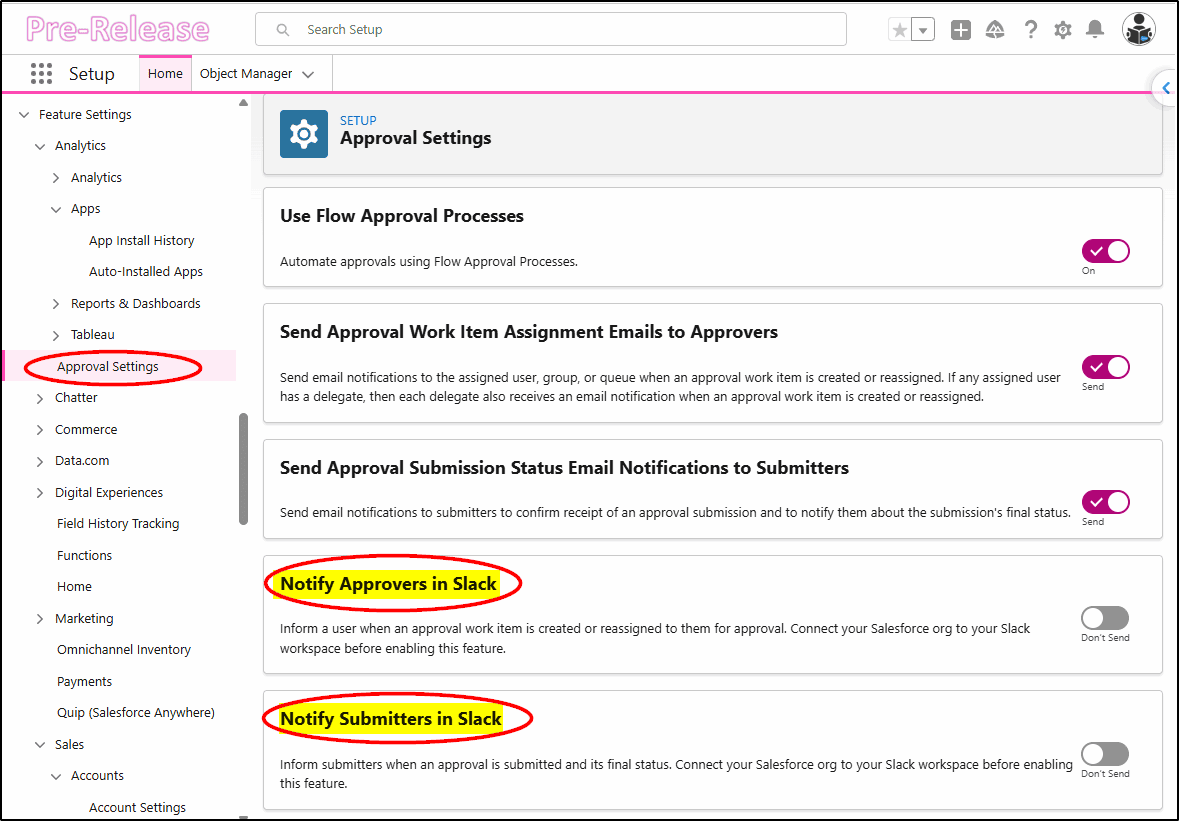
When using the new Flow approval process, you can directly notify both approvers and submitters in Slack with these two new settings:
Slack Panel for Records
The new Slack side panel provides a new way to access Salesforce Channels from within a Lightning record page. Available in Lightning Experience in Essentials, Starter, Pro Suite, Professional, Enterprise, Unlimited, and Developer editions. For new orgs in Enterprise and Unlimited editions, it is available by default.
To enable, configure in Setup -> Slack Channels for Records.
Then, when configured, turn on Show Slack Button on Selected Objects.
More detailed information on the configuration here: https://help.salesforce.com/s/articleView?id=slack.slack_salesforce_channels_setup.htm&type=5
* Note: Supports Desktop record page configurations only, and Experience Cloud is NOT supported.
LWC in Dashboards
In Summer ’26, you can add a Lightning Web Component (LWC) to a Dashboard.
For example, a business analyst can use a custom LWC to display a waterfall chart or other visualizations that are not available in standard dashboards.
You can add only *one* custom Lightning Web Component to a dashboard.
Flow Data Table – Links to Related Records
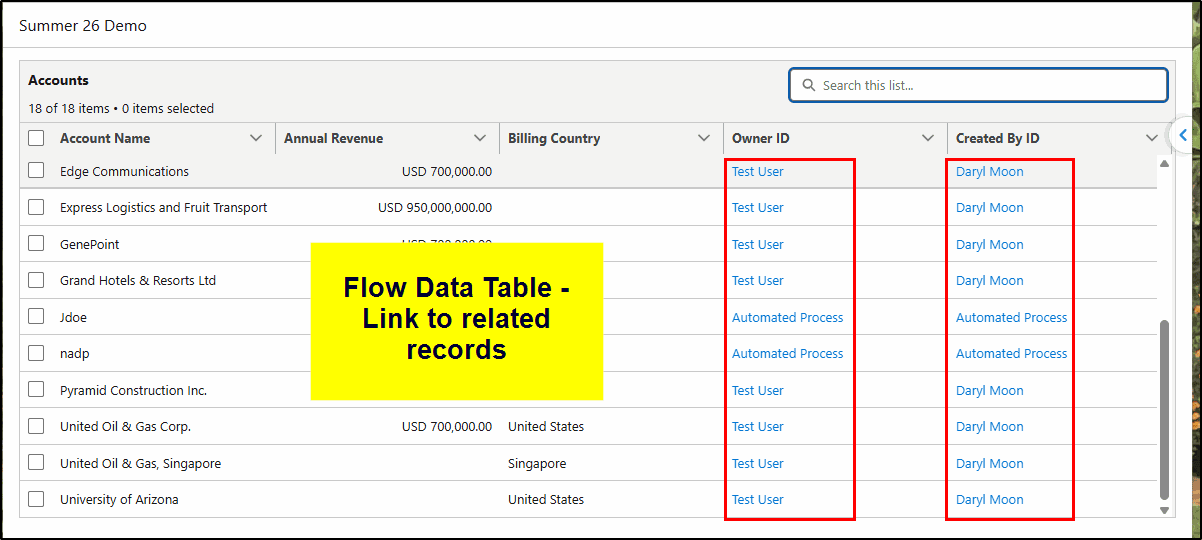
When building custom automations, you often want to display a list of records in a data table. The Flow Data Table has now been enhanced to show not just the IDs of related records but the actual record names, and they are linkable too. No need to create additional formulas just to provide this functionality.
When configuring the columns, simply select the checkboxes: “Show record name” and “Link to record”.
This makes the use of the data table in custom screen flows way more useful and quicker to configure.
Screen Flow – Radio Button Group
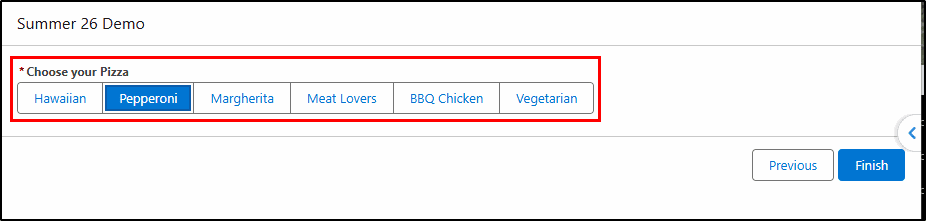
In a screen flow automation, you can now define a Radio Button Group that displays as a horizontal group of choice buttons. You can allow users to select one or more options, and you can also set a default option.
This is an alternative to a drop-down list, a series of checkboxes, or radio buttons.
Learn More How We Can Help You
At KeyNode Solutions, a leading San Diego Salesforce Partner, we want to keep our visitors and clients up to date with the latest information. If you have any questions about features in this release, please call us at 1-858-215-5371 or contact us at hello@keynodesolutions.com.
About the Author
 Daryl Moon brings over 40 years of experience across consulting, technical, management, and training roles in government and the private sector. He combines deep theoretical knowledge with practical, hands-on expertise.
A Salesforce professional with nine certifications and more than 1,100 Trailhead badges, Daryl continues to design and deliver Salesforce training through CertifyCRM.com. He is an active contributor to the Salesforce ecosystem, regularly presenting at user groups, virtual conferences and within the Trailblazer Community. You can learn more about Daryl at https://www.linkedin.com/in/daryl-moon/.
 KeyNode Solutions is a full-service 100% US-based Salesforce Consulting Partner company. Combining experience, business acumen and AI power, we deliver the ultimate Salesforce solutions to grow your business: implementation, integration, customization and development. Our best-in-class, customizable Salesforce Managed Services are available nationwide.

Salesforce Winter ’27 – The Top Features
The next Salesforce release is fast approaching, with releases being scheduled on Sept 4, Oct 2nd and Oct 9th. Being the release just before Dreamforce, it’s jam-packed with lots of great new features. Once [...]

Salesforce Summer ’26 – The Top Features
The next Salesforce release is coming soon, with releases being scheduled on June 5, 12, and 13th. This release is packed with lots of great new features and still contains a heavy emphasis on [...]

How Salesforce Service Cloud Transforms Customer Support Operations
Customer expectations have never been higher. Today’s customers demand fast responses, personalized interactions and consistent service across every channel. Organizations that rely on disconnected systems and manual processes struggle to keep up. To stay [...]
Measuring & Improving Customer Support Performance with Salesforce Analytics
Customer support leaders face increasing pressure to deliver faster service, higher satisfaction and consistent performance across teams. Without accurate data and real time visibility, it becomes difficult to identify gaps, manage workloads and drive [...]

Using Salesforce to Deliver Omnichannel Customer Support at Scale
In today’s connected world, customers expect fast and consistent support across every channel. Whether they reach out through email, phone, chat, social media or self service portals, they want seamless interactions without repeating information. [...]

How Salesforce Automation and AI Reduce Support Response Times
Fast response times are critical to delivering exceptional customer service. In a digital first environment, customers expect immediate answers and seamless interactions across every touchpoint. Long wait times and delayed resolutions can quickly erode [...]