


The Winter ‘24 Salesforce release has just been delivered, along with some awesome new features. Here is our summary of the top features that users can benefit from this latest release.
Lead and Contact Intelligence
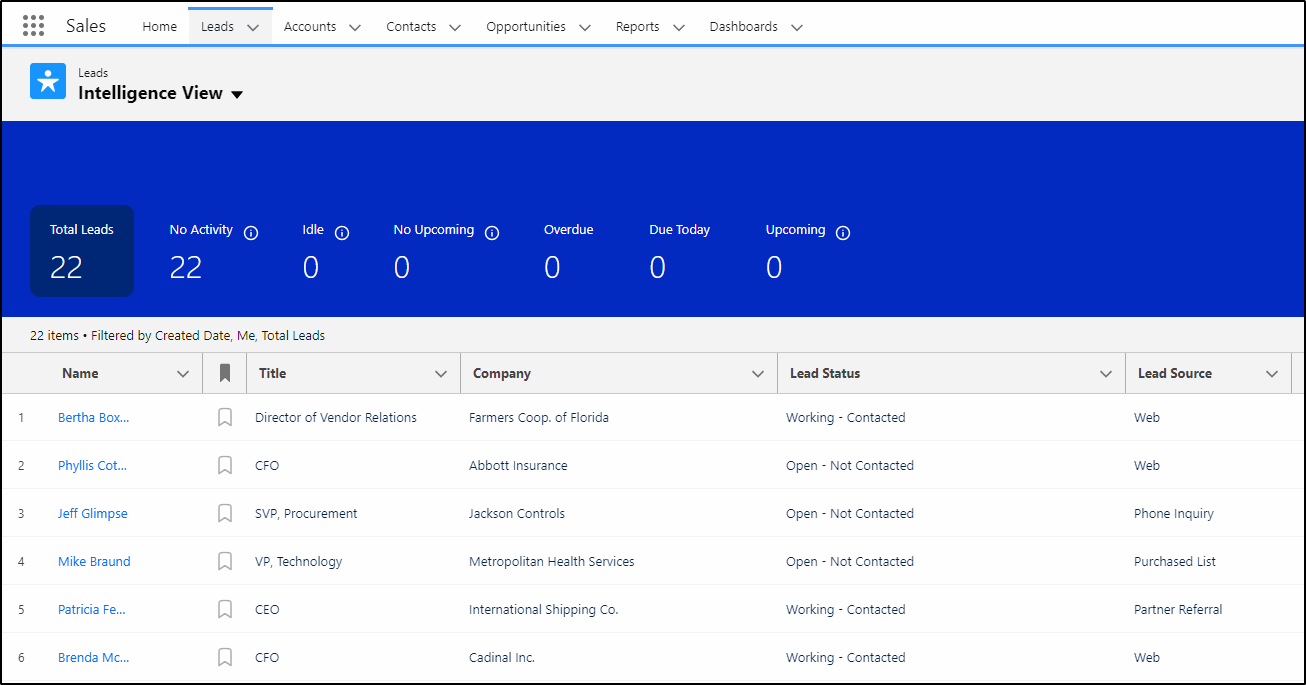
A new Salesforce Intelligence View is now available for both Leads and Contacts. This view can display useful information about activities for both leads and contacts as well as allowing you to take actions and update records all in one place. Be sure to ask your admin to enable both features under Setup -> Lead Intelligence View Setup and Setup -> Contact Intelligence View Setup.

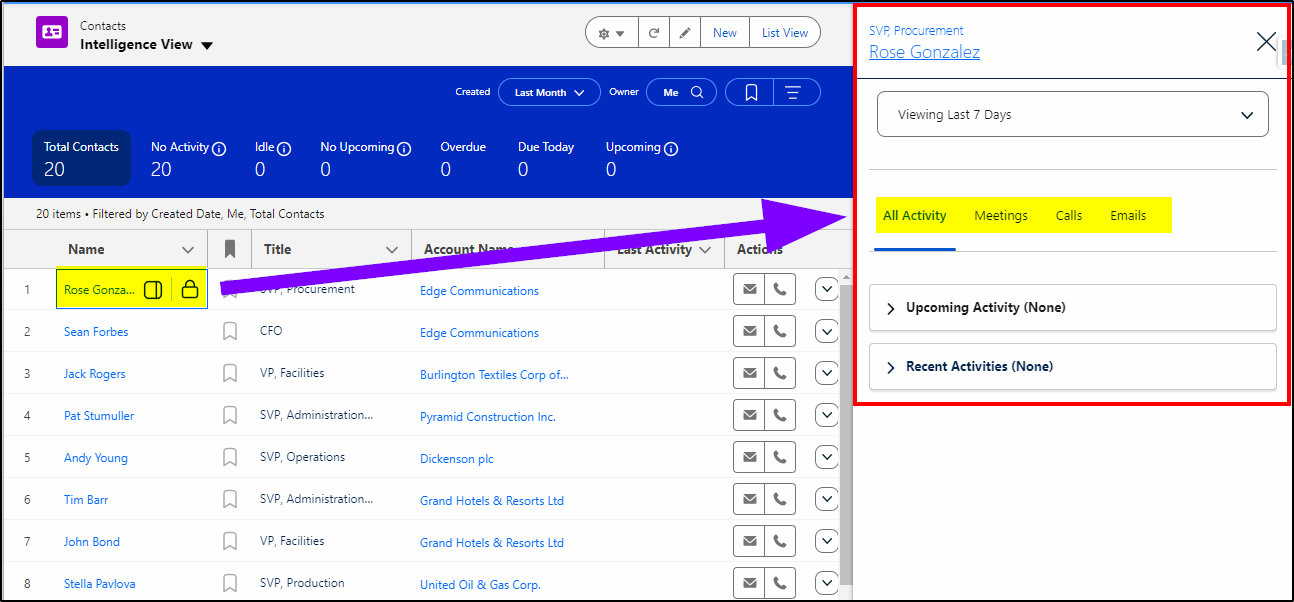
With a contact (or lead) record selected, you can quickly see all recent activity and add new activities.
Salesforce Dynamic Forms for Mobile
While this is a technical feature that you need to get your admin to configure, the same level of customization that has been available on the desktop environment is now available on the mobile app.
To enable this feature in Salesforce, your admin needs to enable “Dynamic Forms on Mobile” in the mobile app setup configuration.
Mass Actions on Salesforce Related Lists
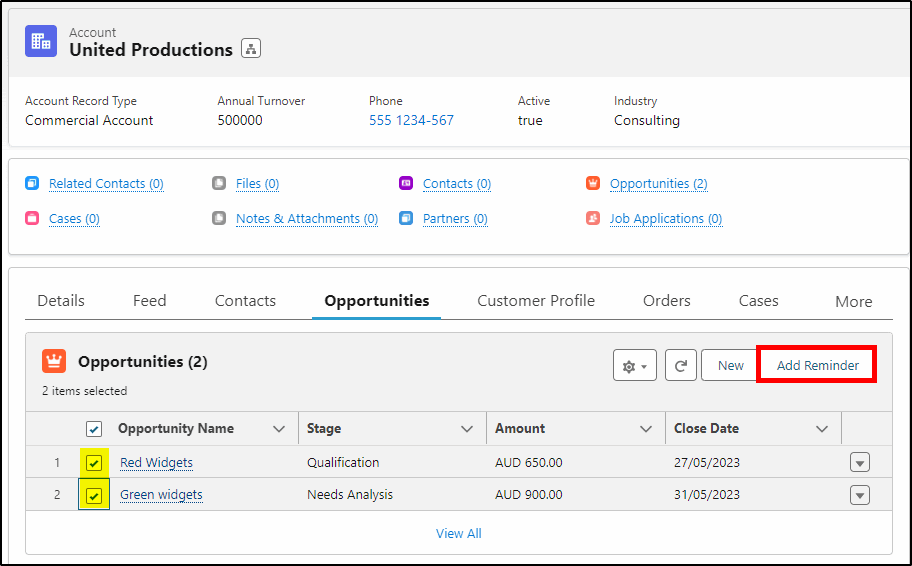
Another feature requiring your admin to setup, mass actions on related lists allows you to perform quick actions on up to 100 records – all from a related list of records. You can create related records or update existing records all without leaving the current page. Imagine being able to close a number of open cases for an account or adding a reminder task for multiple open opportunities for an account – with just a couple of clicks!
Dashboard Ownership in Salesforce
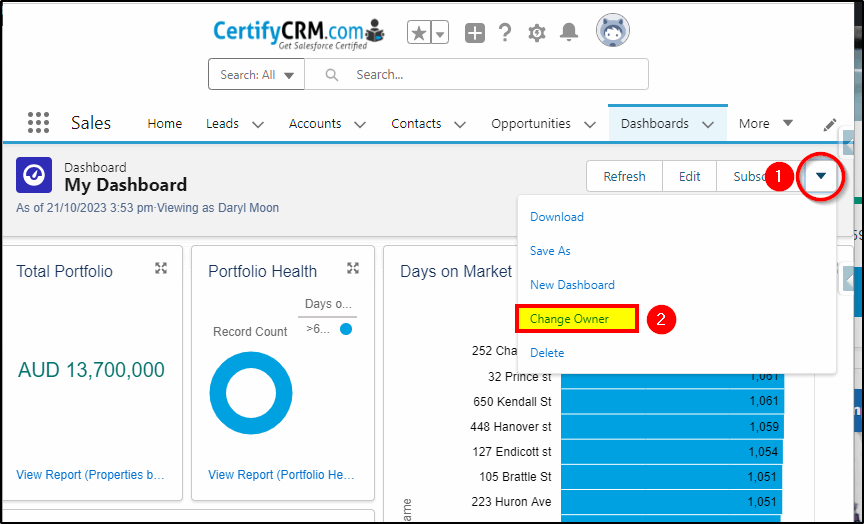
You can now transfer the ownership of dashboards. Previously you needed to clone/recreate the dashboard to change the ownership. There is an admin setting to configure this under Setup -> Reports and Dashboards Settings and then it’s simply a matter of opening the dashboard and selecting the owner.
Forecast Updates
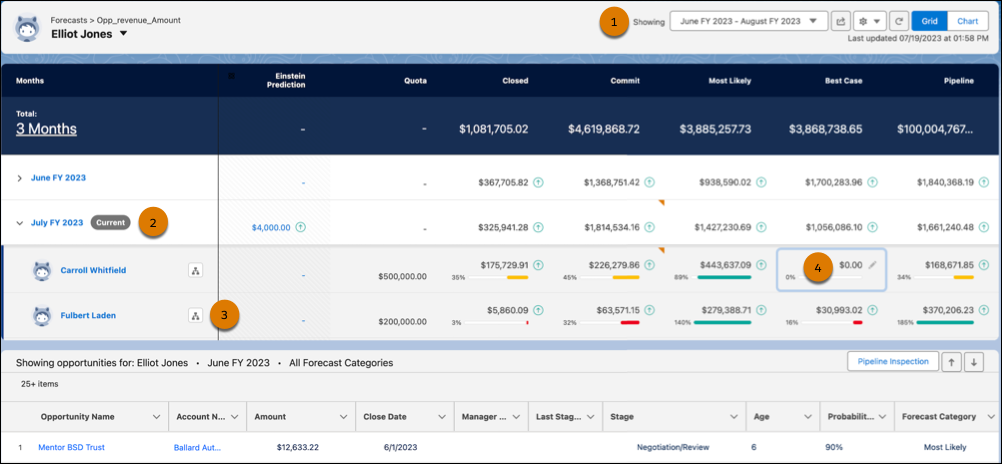
Salesforce forecasts have had a lot of attention lately. In this release, the display is much easier to understand with the forecast range (1), the selected period (2), the selected record (3) and updated icons (4) that indicate which fields are clickable for more information.
Three Mobile Improvements
There are three major improvements for the Salesforce Mobile app and Salesforce Field Service app:
- Scan Documents with a mobile device – Salesforce Mobile app and Salesforce Field Service app
- Access NFC tags (mobile payments) – Salesforce Field Service app and Mobile Publisher for Experience Cloud app
- Access Biometric Capabilities – Mobile Publisher for Experience Cloud app
Improved color contrast
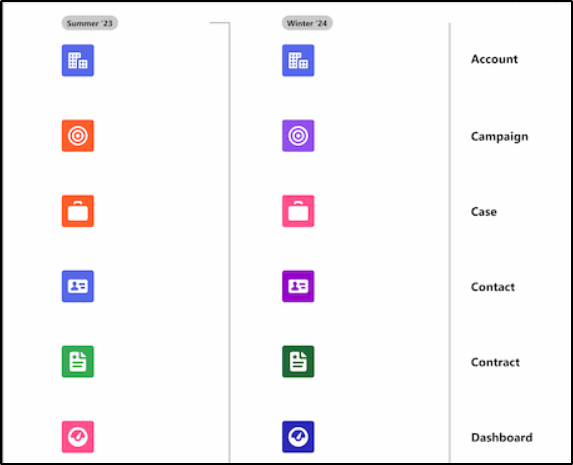
You will notice some icons have changed color slightly to better meet the needs of people with disabilities. This is a continuation of the work that commenced with Summer ‘23.
Email Enhancements
Email productivity tools such as send later, email tracking, text shortcuts, and email engagement are now included in Sales Cloud (Enterprise and Professional editions). Email engagement features include My Feed from the Outlook and Gmail integration panels, notifications from Sales Cloud Everywhere, and custom report types for engagement data. Some setup required; these features are available for up to 100 users.
Health Cloud
One of the important industry clouds, the Health Cloud has had a number of improvements in the Winter ’24 release including:
- Actionable Relationship Center Enhancements
- Advanced Therapy Management Enhancements
- Assessments Enhancements
- Behavioral Health App
- Crisis Support Center Management Enhancements
- Healthcare Provider Enhancements
- Home Health Enhancements
- Integrated Care Management Enhancements
- Intelligent Document Automation Enhancements
- Intelligent Sales Enhancements
- Marketing Cloud Engagement for Health Cloud
- New Shield Platform Encryption for Health Cloud
- Referral Enhancements
- New and Changed Objects, Invocable Actions and Metadata Types
More details on these Health Cloud improvements here.
Salesforce Flow Improvements
While the technical details of these changes are for admins/developers of the Salesforce platform, the winners are the users who can benefit from these new features when automations are built utilizing these features.
Transform Data in Flows (beta)
A new Transform element in Salesforce Flow allows flow developers to more easily build interfaces to external systems where the data is not represented exactly the same. This transform features both maps the fields and performs changes to data types or data values on the fly, enabling more complex integrations to be built with clicks-not-code.
More Reactive Components
In Spring ’23, reactive screen components were released. In this release, even more components support reactivity. What these mean for end users is that more complex screen flows can be built that require less clicks of the next button for changes in one field to impact those of other fields. Screen flows with reactive components are beginning to act like full blown interactive web apps without the need for writing code.
Flows Triggered on Data Cloud
Flows can now be built for changes that occur in the Data Cloud. These are known as Data Cloud-Triggered Flows.
New Wait Elements
Salesforce introduced three new Wait elements to replace the Pause element:
- Wait for conditions
- Wait for Amount of Time
- Wait Until Date
Retirements
Along with the many new features are some older features being retired: the News feature, automated account logo, and automated account fields have been retired in Winter ‘24. You will no longer be prompted for account names; fields will not be automatically completed and logos will not be added automatically. The news component will be removed from page layouts.
At KeyNode Solutions, a leading San Diego Salesforce Partner, we want to keep our visitors and clients up to date with the latest information. If you have any questions about this release, contact us at hello@keynodesolutions.com or call us at 1-858-215-5371.
 KeyNode Solutions is a full-service Salesforce Consulting Partner company. We deliver the ultimate Salesforce solutions to grow your business: implementation, integration, customization, and development. Our best-in-class Salesforce managed services for ongoing support available nationwide.

Beyond the Chatbot: Managed Services for Salesforce Agentforce
As artificial intelligence becomes central to digital transformation, businesses are looking beyond basic automation tools. Chatbots were only the beginning. Today, organizations want intelligent systems that can reason, act and deliver measurable business outcomes. [...]

Salesforce Shield & Data Mask: Managed Security Services
Generative AI is reshaping how organizations use CRM data. Intelligent automation, predictive insights and AI driven workflows are unlocking new efficiencies across sales and service teams. However, as AI tools access increasing volumes of [...]

How Can Salesforce Help Increase Sales?
In today’s competitive business environment, increasing sales is not just about having a great product or service, it’s about understanding customers, streamlining processes and making data-driven decisions. Salesforce, the world’s #1 Customer Relationship Management [...]

What Salesforce Features and Benefits Help Salespeople?
Sales success today depends on speed, accuracy and strong customer relationships. Salesforce is designed to support salespeople at every stage of the sales cycle, helping them work smarter and close deals faster. At KeyNode Solutions, [...]

Why Do Companies Use Salesforce?
Companies adopt Salesforce because it helps them manage customers, grow revenue and operate more efficiently. In a business environment where data speed and customer experience matter more than ever, Salesforce provides a powerful platform [...]

Why Salesforce Is Good for Sales Reps
Sales reps succeed when they have clarity, speed and confidence in their daily work. Salesforce has become one of the most trusted sales platforms in the world because it delivers exactly that. For organizations [...]