


Another Salesforce release jam-packed full of great features is almost ready with the Summer ’25 release due on May 17, or the weekends of June 7 or 14th. The actual release is staggered over several weekends, and the exact date for your instance can be found by visiting status.salesforce.com, entering your instance name, and checking the maintenance tab.
Much of this release is focused on one of two topics: AI Features or Automation (Salesforce Flow). Rather than covering the AI features in detail, we provide links to those features where those with the additional AI licenses can review this content. We will instead focus on the features available to everyone for automation (Salesforce Flow).
Salesforce Flows – Automation Features
Flow Builder is the main tool used for automating Salesforce processes, making the workload for end users much faster and simpler. Experienced Salesforce Administrators can build these automations quickly using clicks and not code. A lot of effort has been put into improving the capability of Flow Builder, and this release does not disappoint.
While these may not be tools available to end users, it’s important to see how these tools are evolving and improving, making it easier for your admins and consultants to build complex automations that solve your business needs.
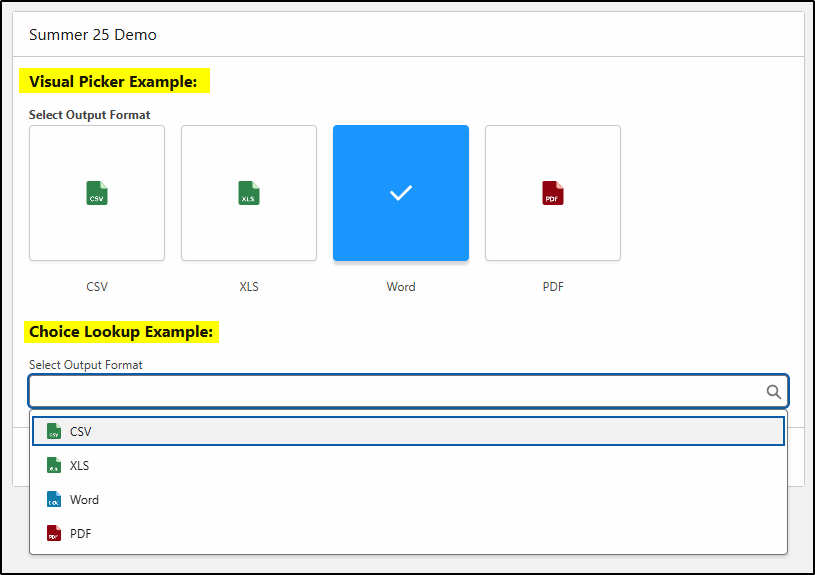
Visual Picker
When building a screen flow that involves the end user making choices from a list of values, that list can now be represented graphically, making the selection easier.
Component Width
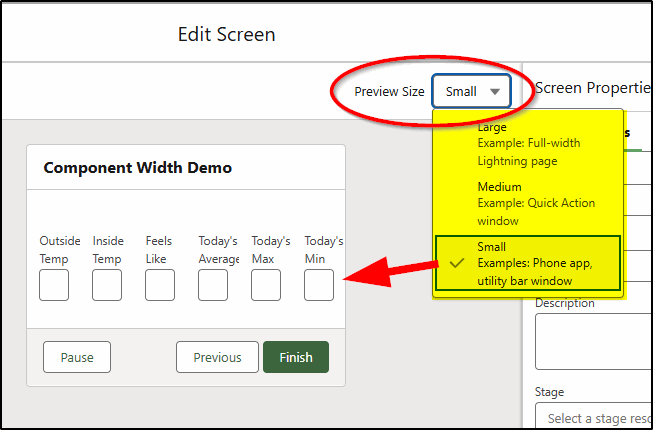
Previously, when adding fields to a screen flow, there was a maximum of four columns permitted. Now you can add up to 12 components, with the width of the page divided into 12 units. Each component or field can have a separate width from 1-12 units. The page could have 12 very small single unit fields, 6 x 2 units, 4 x 3 units, 3 x 4 units, or any other combination as long as the total width equals 12 units.
Preview Size
When adding these various-sized fields (and other components) to a page, care needs to be taken to ensure the layout works on a desktop, tablet, and also phone devices. Fortunately, there is a new option to provide this preview:
Reactive Screen Actions (GA)
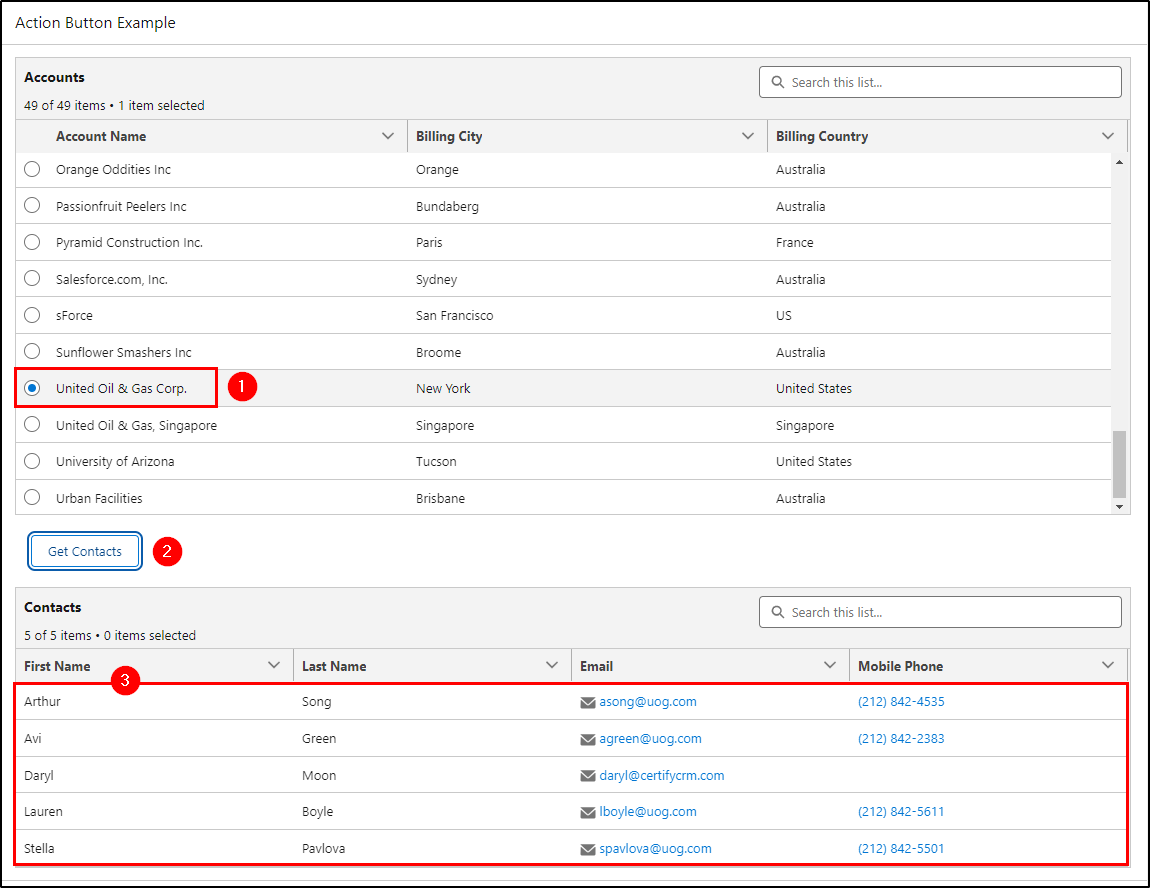
Reactive Screen Actions are now generally available, and they allow you to have more dynamic screen flows that react to data changes on the page without having to click the next page and display a new page. For example, reactive actions allow you to build a single screen flow that can display a list of Account records, allow you to select one, and then dynamically display all the Contacts for that account. Alternatively, you may want to display all open Cases or Open Opportunities and perform an update on one or more of these records. Now this can all be done without leaving the initial page.
Send Email Improvements
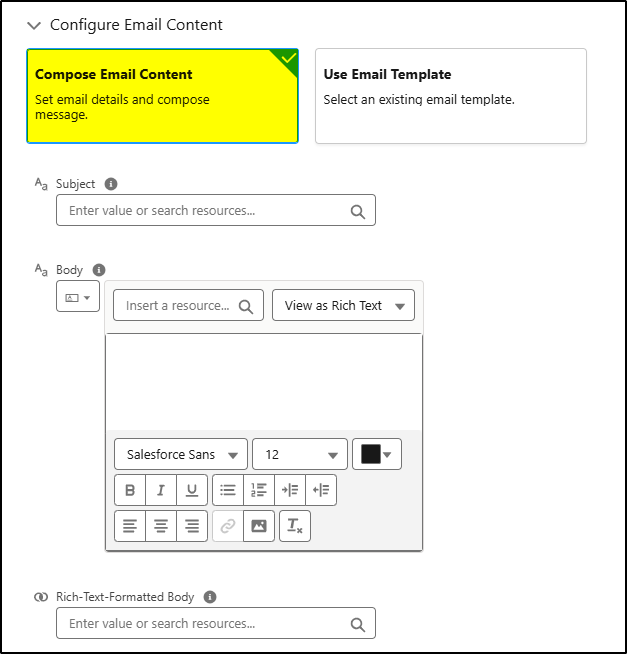
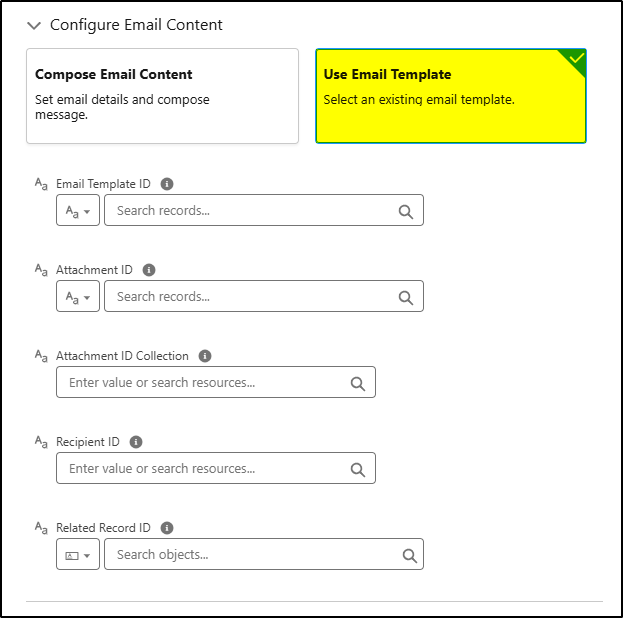
Configuring a flow to send an email has been improved to make the process much easier. Now you are guided to either manually compose all the components of the email, or you can select to use an email template and the configuration page changes to reflect the settings for this choice.
The email template configuration includes the fields required when using a template, hiding those fields that are contained in the template, making the configuration less prone to producing configuration errors.
Debug Improvements
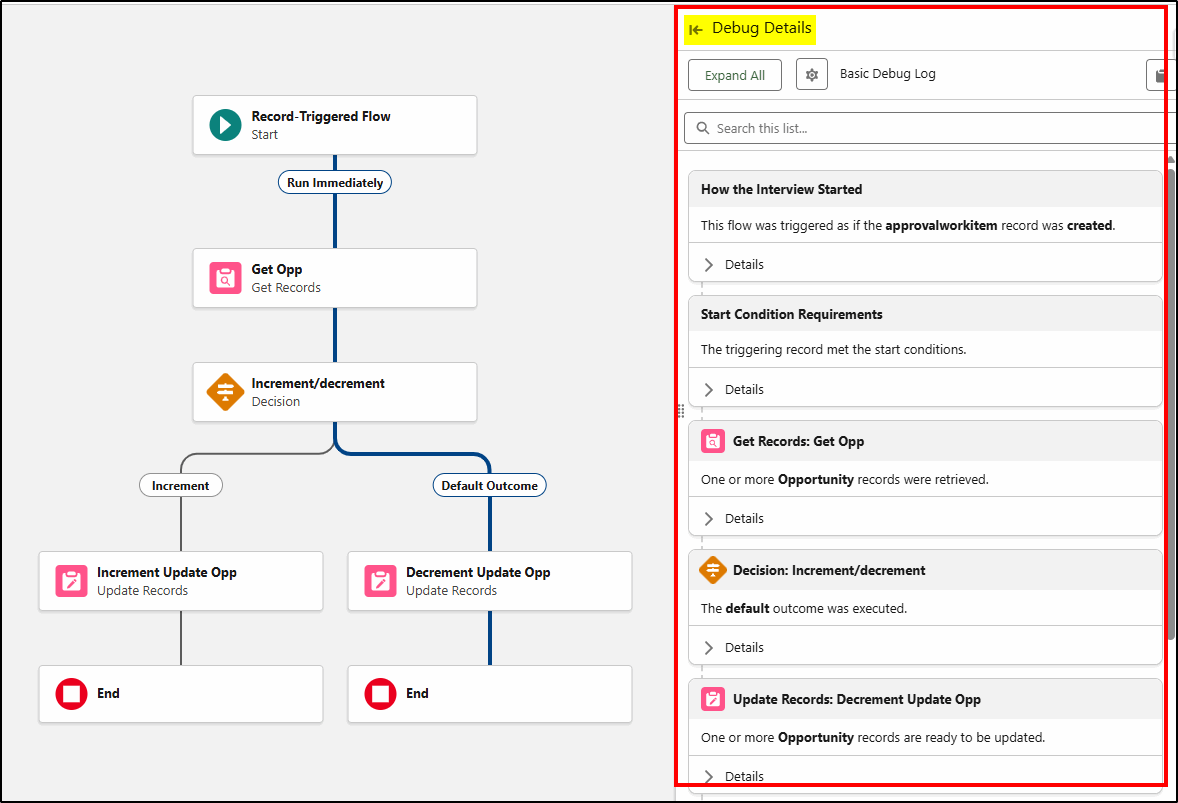
When debugging flows, the side panel has been expanded in width to display more detail. The individual sections of the display have been changed into individual cards that can be easily expanded or collapsed to show or hide details. This makes the debug process easier and hides unnecessary detail until needed. The search function makes finding key items quicker and easier.
Improved File Upload
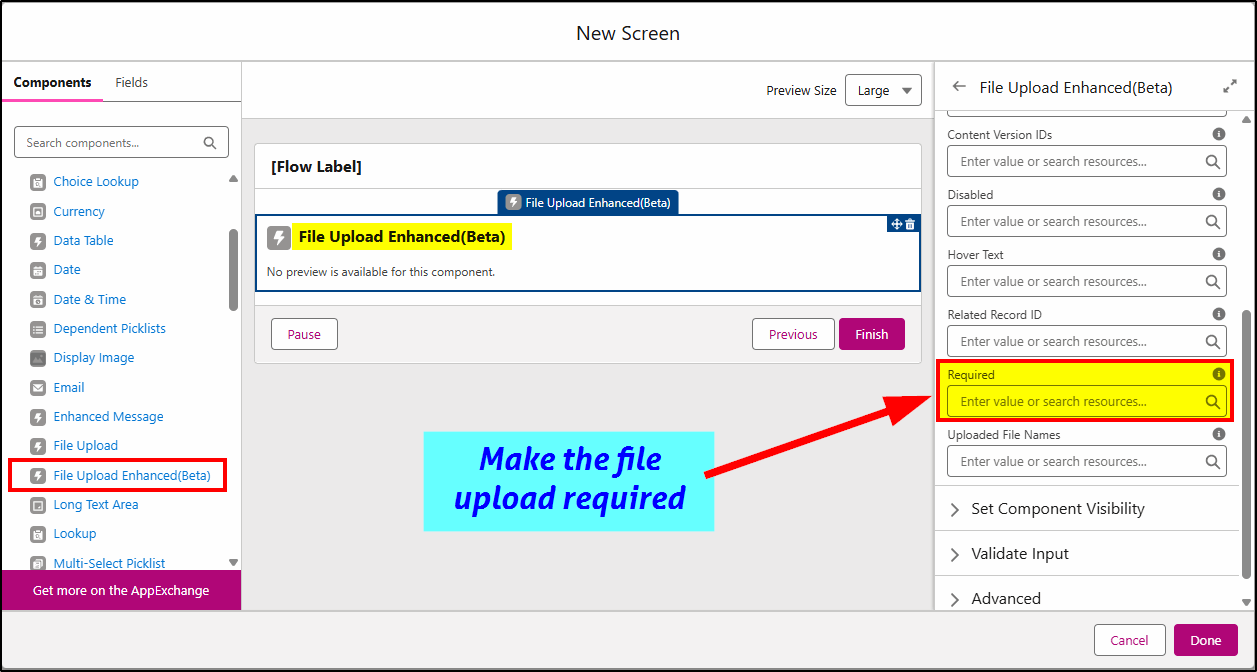
The file upload component has been improved by adding a “required” field, so if a screen flow requires the user to upload a file, you can now make this mandatory before they can proceed further in the flow.
Flow Approval Process updates
The next generation of Salesforce approval processes is based on using orchestrations from within a flow. This was initially launched in Spring ’25 and has received significant upgrades in this release.
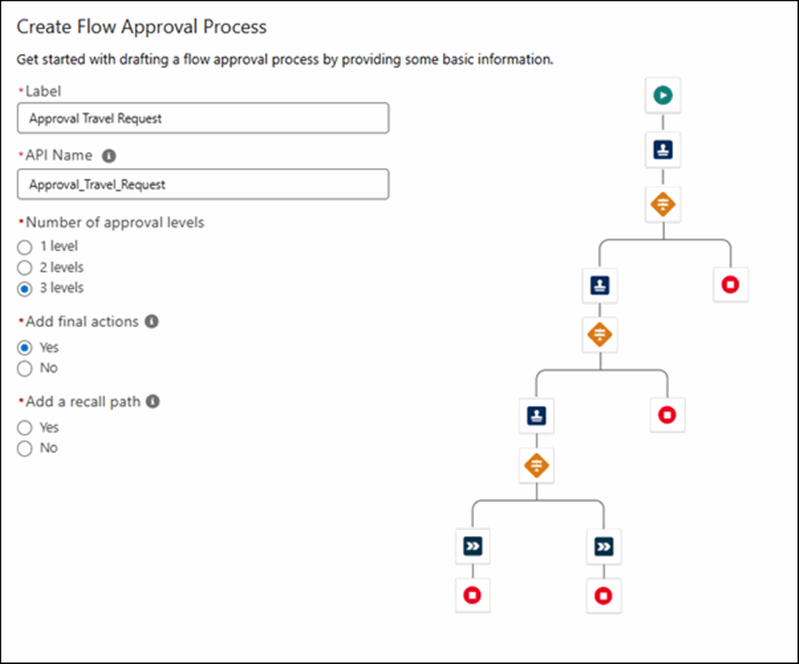
There is a new wizard that guides you through the process of creating a new approval process, and this supports up to three (3) levels of approvals.
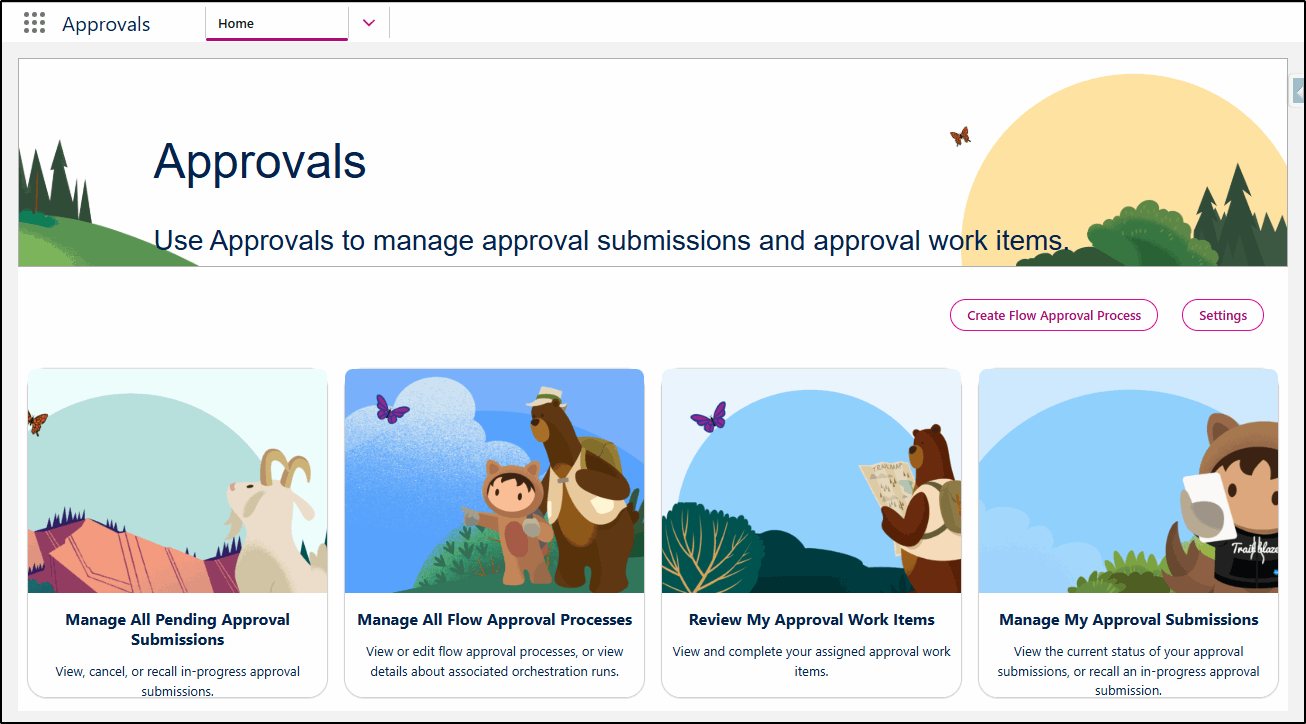
Within the wizard, you can configure the paths, stages, and elements required for your approval process.
AI Features
Many of the new AI features are only available to those who have purchased additional license features or specific Einstein AI licenses. Details on these features can be found in the official release notes here.
Here is a quick summary of Sales/Service Cloud features:
Sales Cloud
- Identify Coachable Moments by Uploading Recorded Video Calls
- Improve Sales Processes by Using Conversation Transcripts in Flows
- See Pricing, Challenge, and Objection Topics in Sales Signals
Service Cloud
- Respond Quickly to Changes in Service Channel Demand with Agentforce
- Accelerate Case Resolution and Boost Service Efficiency with Einstein Follow-Up Emails
- Let Service Reps and Supervisors View Translated Transcripts and Respond in the Customer’s Preferred Language (Beta)
- Provide Better AI Support with Real-time Monitoring of Email Conversations
- Declutter Omni Supervisor with Only Relevant AI Agents
At KeyNode Solutions, a leading San Diego Salesforce Partner, we want to keep our visitors and clients up to date with the latest information. If you have any questions about features in this release, contact us at hello@keynodesolutions.com or call us at 1-858-215-5371
About the Author
 Daryl Moon brings over 40 years of experience across consulting, technical, management, and training roles in government and the private sector. He combines deep theoretical knowledge with practical, hands-on expertise.
A Salesforce professional with nine certifications and more than 1,100 Trailhead badges, Daryl continues to design and deliver Salesforce training through CertifyCRM.com. He is an active contributor to the Salesforce ecosystem, regularly presenting at user groups, virtual conferences and within the Trailblazer Community. You can learn more about Daryl at https://www.linkedin.com/in/daryl-moon/.
 KeyNode Solutions is a full-service Salesforce Consulting Partner company. We deliver the ultimate Salesforce solutions to grow your business: implementation, integration, customization, and development. Our best-in-class Salesforce managed services for ongoing support available nationwide.

Beyond the Chatbot: Managed Services for Salesforce Agentforce
As artificial intelligence becomes central to digital transformation, businesses are looking beyond basic automation tools. Chatbots were only the beginning. Today, organizations want intelligent systems that can reason, act and deliver measurable business outcomes. [...]

Salesforce Shield & Data Mask: Managed Security Services
Generative AI is reshaping how organizations use CRM data. Intelligent automation, predictive insights and AI driven workflows are unlocking new efficiencies across sales and service teams. However, as AI tools access increasing volumes of [...]

How Can Salesforce Help Increase Sales?
In today’s competitive business environment, increasing sales is not just about having a great product or service, it’s about understanding customers, streamlining processes and making data-driven decisions. Salesforce, the world’s #1 Customer Relationship Management [...]

What Salesforce Features and Benefits Help Salespeople?
Sales success today depends on speed, accuracy and strong customer relationships. Salesforce is designed to support salespeople at every stage of the sales cycle, helping them work smarter and close deals faster. At KeyNode Solutions, [...]

Why Do Companies Use Salesforce?
Companies adopt Salesforce because it helps them manage customers, grow revenue and operate more efficiently. In a business environment where data speed and customer experience matter more than ever, Salesforce provides a powerful platform [...]

Why Salesforce Is Good for Sales Reps
Sales reps succeed when they have clarity, speed and confidence in their daily work. Salesforce has become one of the most trusted sales platforms in the world because it delivers exactly that. For organizations [...]