


With another Salesforce release about to be deployed, imminent (May 17, June 7, June 14) along comes exciting new features for Summer ’24. We have taken the time to dig through hundreds of pages of release notes to pick out the key features that will impact you – the business user of Salesforce. While there are plenty of other changes that occur “under the hood”, we try to focus on the changes that you can see and use every day. The Summer releases are notoriously internal admin/developer focused and this one is no exception but we have found a few gems for you.
If your environment has already been upgraded to Summer ’24 you will see the new logo when you login or refresh a page. It shows Appy the Bobcat and Max the Mule heading off on a nautical adventure.

Security Improvements
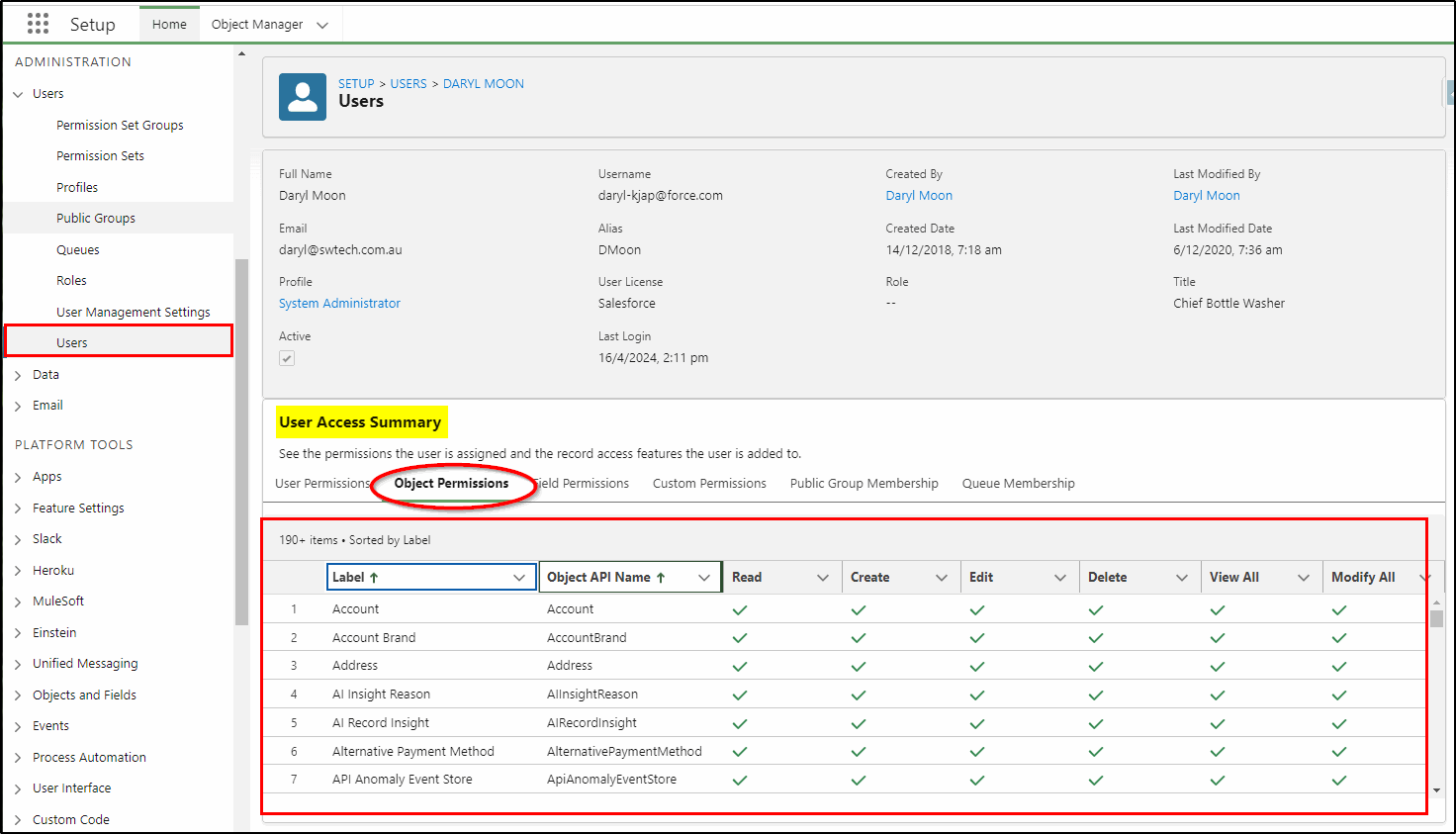
There have been a number of security enhancements that make it easier for Salesforce Administrators to manage security. They can now view a summary of User Permissions, Object Permissions, Field Permissions, Custom Permissions, Public Group Memberships, and Queue Memberships all on a single screen. This makes configuration and troubleshooting access issues much simpler for your admins.
User Access Policies
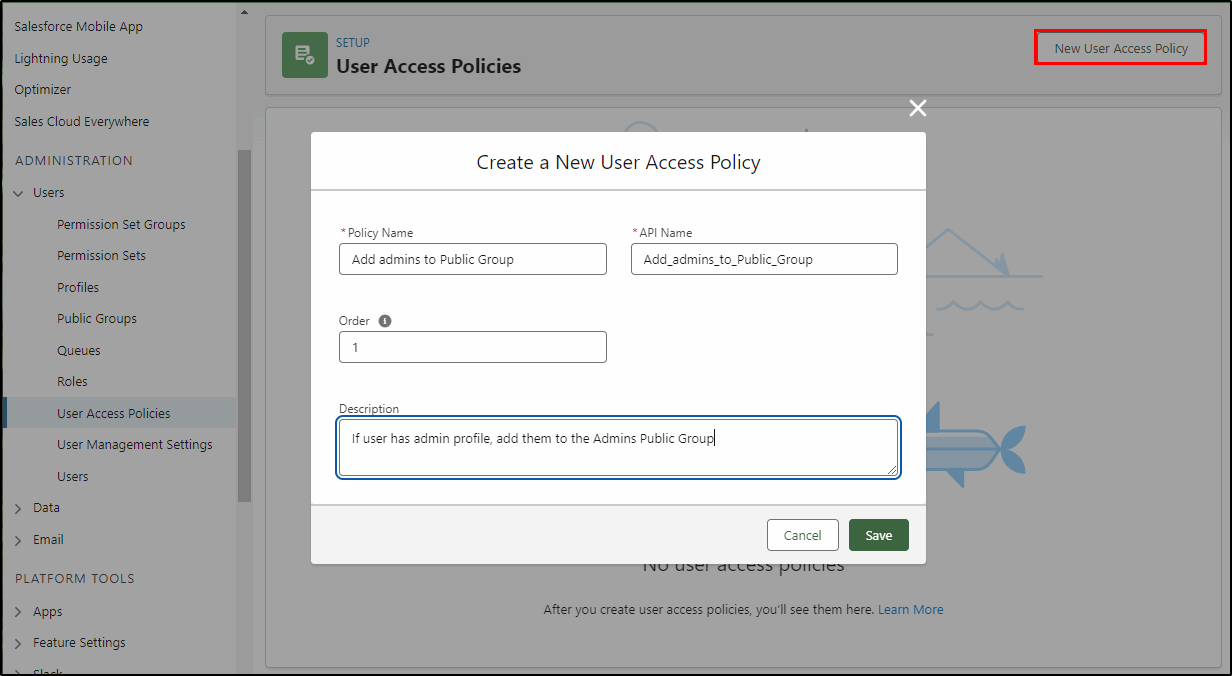
User Access Policies are now Generally Available in Summer ‘24.
This feature allows your Salesforce Administrator to automate adding new users to Permission Sets, Permission Set Groups, Permission Set Licenses, Package Licenses, Public Groups and Queues (the security settings). This feature not only automates the process, saving a lot of time but can also reduce mistakes made when configuring new user accounts or updating existing ones. This features allows the creation of policies that automatically grant or remove access whenever users are created or existing user accounts are updated.
MFA Is On by Default for New ORGs
To help prevent unauthorized access to Salesforce accounts, multi-factor authentication (MFA) is required when users log in. To help customers satisfy this contractual security requirement, MFA is now a default part of the direct login process when a new production org goes live.
MFA is one of the simplest, most effective ways to prevent unauthorized account access and safeguard your data and your customers’ data. To help protect against threats like phishing attacks and credential stuffing, Salesforce requires all users to log in with MFA. Verification method options include authenticator apps, security keys, and built-in authenticators.
Freeze Users
You can now grant the ability to freeze and unfreeze users by using the Freeze Users permission. This permission can be assigned to any user that requires the ability to freeze a user account and prevent the user from logging in to Salesforce. Previously, you would have had to give them the Manage Users permission which grants many more rights. Now if you have a HR person who needs to action staff departures quickly and confidentially, they can be assigned this permission.
You can also allow them to view and download login history with the Monitor Login History permission. With this permission, the user can access the login history related list on user records and view data in Login History reports with relevant report permissions.
Blank Space
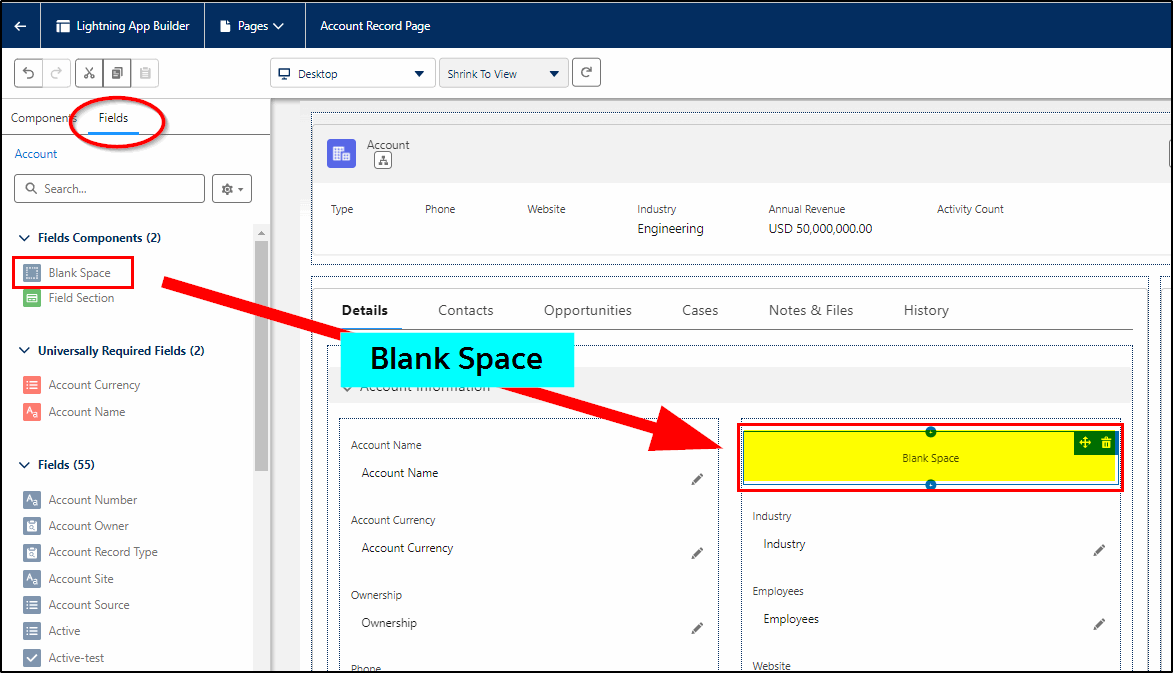
We can now add a blank space in record pages to balance the number of fields and keep them in proper alignment. This is one of the most popular new features amongst admins keen to keep their pages neat and well aligned.
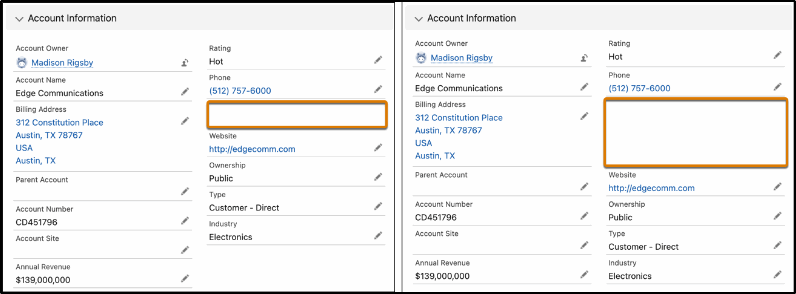
The two images below show how horizontal alignment can also be specified to keep them aligned. The left image shows the default behavior without Align Fields Horizontally selected. The blank space appears with a single row height.
On the right, the horizontal alignment setting was selected, causing the Website field to stay aligned horizontally with Parent Account instead of collapsing upward. The blank space height is now expanded to align with the row height of its neighbor, Billing Address.
Conditional Tabs
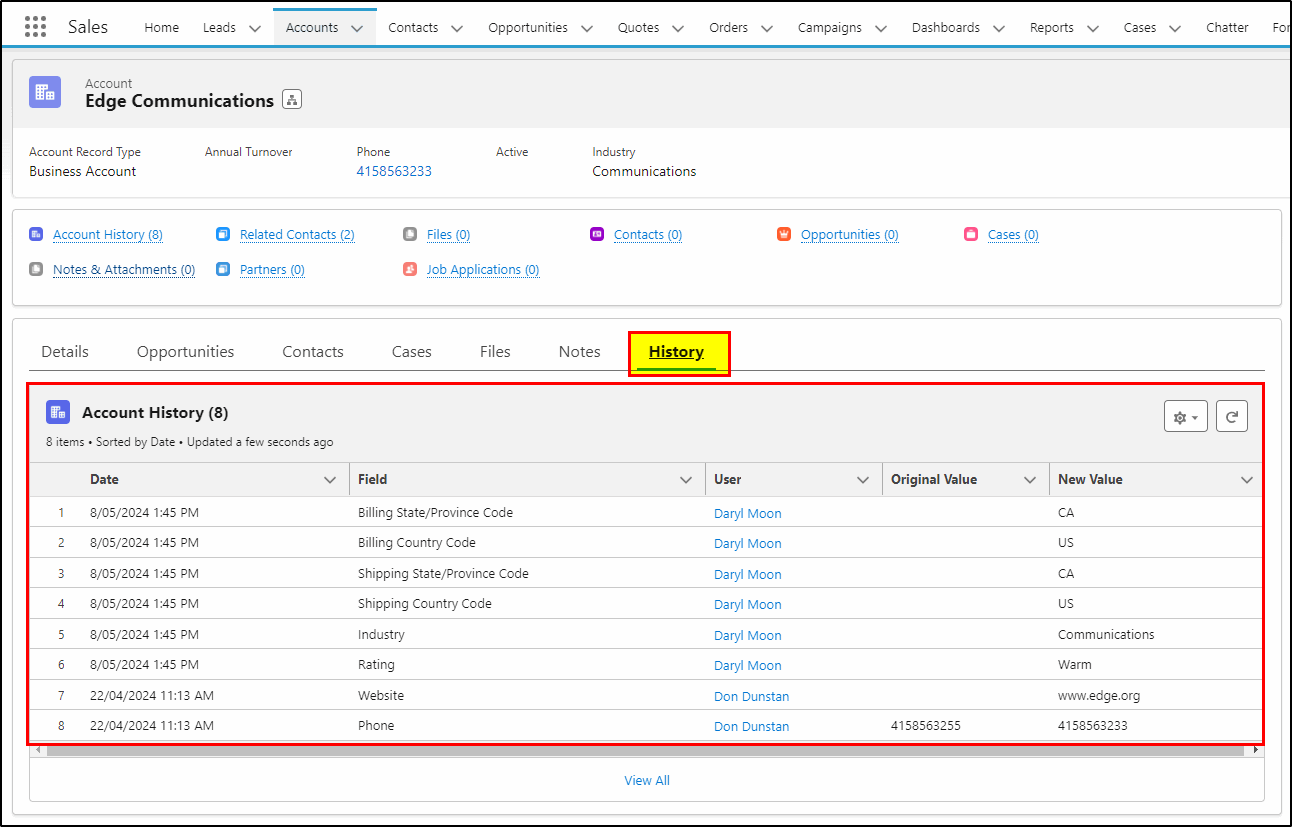
We can now apply “conditional visibility” to tabs on a record page. What this means is that a tab and its content can be hidden or displayed based on fields in that record, or an attribute of the user, or the device being used. In the example below, we can hide the history tab and its contents from everyone except for the system admin. It may also be appropriate to not display this if the user is on a mobile device.
Another use for this feature is when we break a detail page into multiple tabs and only show then when the record reaches a specific stage. On an opportunity record for example, we can hide some of the fields related to negotiation and other stages near the end of the sales process when the opportunity is new. This not only reduces clutter and simplifies data entry but it also makes navigation easier.
Improved Lightning performance
Salesforce Lightning Performance is improving! 12% improvement in the last 2 releases and another 40% coming in the next 12 months. How do they measure that improvement and what does it involve? Well its technical but you can get all the details in the link in the comments.

Flow Improvements
There are many improvements to Salesforce Flow that are aimed at the Salesforce Administrators or Developers in your team and they can have an immediate impact on their ability to deliver no-code automations. We have not detailed them here but be sure to talk to the San Diego Salesforce Consultants at KeyNode Solutions and ask them about some of these new features. Feel free to contact us at hello@keynodesolutions.com or call us at 1-858-215-5371 and learn how we can help!
 KeyNode Solutions is a full-service Salesforce Consulting Partner company. We deliver the ultimate Salesforce solutions to grow your business: implementation, integration, customization, and development. Our best-in-class Salesforce managed services for ongoing support available nationwide.

Beyond the Chatbot: Managed Services for Salesforce Agentforce
As artificial intelligence becomes central to digital transformation, businesses are looking beyond basic automation tools. Chatbots were only the beginning. Today, organizations want intelligent systems that can reason, act and deliver measurable business outcomes. [...]

Salesforce Shield & Data Mask: Managed Security Services
Generative AI is reshaping how organizations use CRM data. Intelligent automation, predictive insights and AI driven workflows are unlocking new efficiencies across sales and service teams. However, as AI tools access increasing volumes of [...]

How Can Salesforce Help Increase Sales?
In today’s competitive business environment, increasing sales is not just about having a great product or service, it’s about understanding customers, streamlining processes and making data-driven decisions. Salesforce, the world’s #1 Customer Relationship Management [...]
What Salesforce Features and Benefits Help Salespeople?
Sales success today depends on speed, accuracy and strong customer relationships. Salesforce is designed to support salespeople at every stage of the sales cycle, helping them work smarter and close deals faster. At KeyNode Solutions, [...]

Why Do Companies Use Salesforce?
Companies adopt Salesforce because it helps them manage customers, grow revenue and operate more efficiently. In a business environment where data speed and customer experience matter more than ever, Salesforce provides a powerful platform [...]

Why Salesforce Is Good for Sales Reps
Sales reps succeed when they have clarity, speed and confidence in their daily work. Salesforce has become one of the most trusted sales platforms in the world because it delivers exactly that. For organizations [...]